


How to Compress VOB Files Using Desktop and Online Tools
Although ripped DVDs in digital media are an unconventional video format, they are still used today due to their superb video quality. Unfortunately, VOB files, often found on VIDEO_TS containers, suffer greatly from this downside. Since they contain data from digital video, audio, subtitles, and menus, which results in large file sizes, often 1GB per chunk of data. In this article, we will provide a detailed guide to solving this issue by featuring a solution for compressing VOB files without losing quality. We will solve this issue to support file sharing and digital storage, which the huge file size of raw VOB media may hinder.

- GUIDE LIST
- Part 1. Why VOB Files Are So Large
- Part 2. Best Way to Compress VOB Files to a Certain Size
- Part 3. How to Compress VOB Files Online for Free
- Part 4. FAQs About Compressing VOB Files
Part 1. Why VOB Files Are So Large
Video Object (VOB) files are the container format used in ripped VIDEO_TS data from DVD and Blu-ray discs. These files contain all the data used on traditional DVD media, including video, audio, subtitles, and menus. This essentially makes VOB files the raw and uncompressed digital conversion of data from DVDs.
Due to its raw nature and the data stored in it, most VOB chunks are usually 1GB in size at a minimum. This usually increases depending on the quality of the physical media you have converted, as well as the length of the movie, and the presence of subtitles and menus.
To put it into perspective, most ripped VIDEO_TS usually contains 4 to 7 VOB files, making their size huge and quite impractical when stored on local or cloud storage. Fortunately, there are numerous options to reduce VOB file size, and we will discuss these solutions in the next sections of the article.
Part 2. Best Way to Compress VOB Files to a Certain Size
When looking for a reliable media file compressor, desktop-based solutions should be one of your first options, since these programs are the best in terms of reliability, stability, and performance. In this case, ArkThinker Video Converter Ultimate’s Video Compressor tool is our most recommended solution.
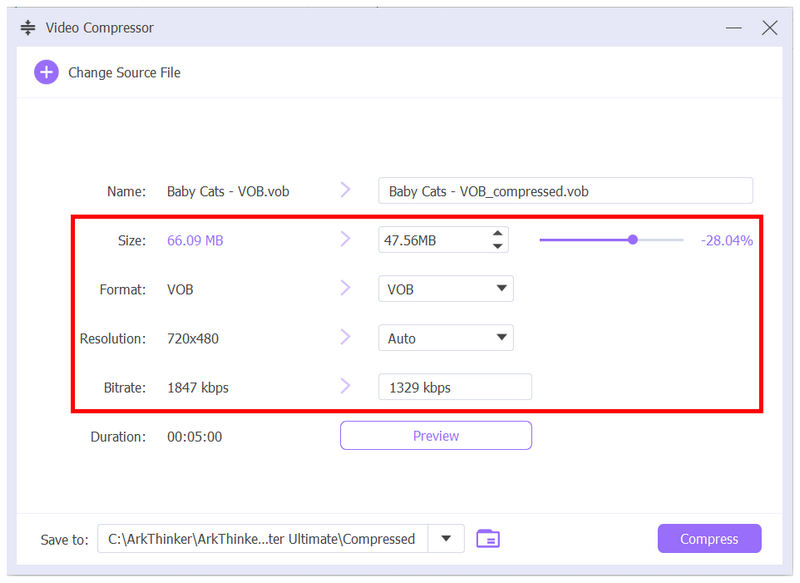
To start, ArkThinker Video Converter Ultimate supports VOB as an input format, despite it being an unconventional video file. Once it has been uploaded into the Video Compressor tool, you can reduce its file size using the customization options in the menu under Format, Resolution, and Bitrate.
You can also reliably trust its compression performance, since the process is supported by its GPU-accelerated system, causing the conversion process to be done within a few minutes despite the larger file size of VOB files.
If you plan on converting the VOB video, you can select among the available output formats, such as MP4, MKV, MOV, and others. This is a big factor, since you can easily convert a ripped DVD into a widely supported video format while also simultaneously compressing its file size.
To learn how to use ArkThinker Video Converter Ultimate as a video compressor tool, make sure to read our three-step guide below on how to use its file size management feature.
Do not forget to download it as well to make following our guide easier.
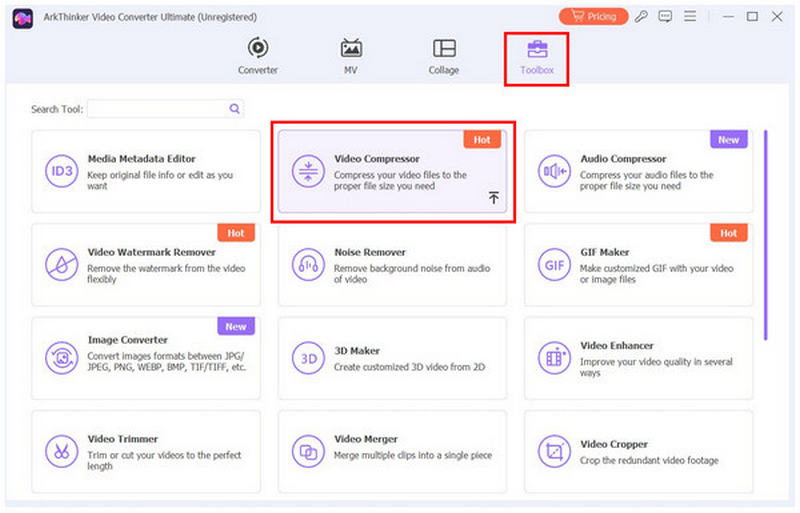
Open ArkThinker Video Converter Ultimate and navigate to the Toolbox feature. Then, select the Video Compressor tool among the available options.
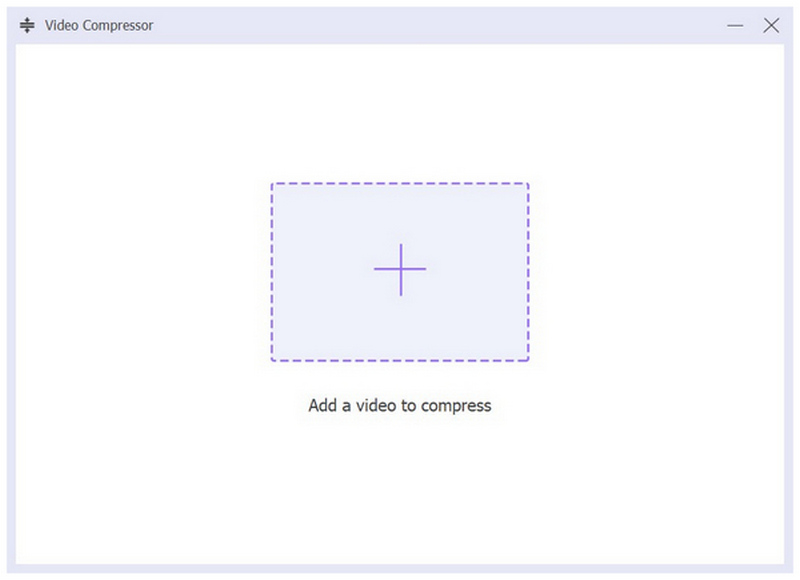
To add the video file you want to compress, select the Add button in the pop-up menu to import it.
Once the VOB file has been added to the Video Compressor tool, you can now compress it by editing the Compression Rate, Format, Resolution, and Bitrate. Finally, select Compress to begin compressing the Google Drive file you are editing.
Why We Recommend It:
When handling large VOB files, stability and performance are the most important factors to consider. In this case, desktop-based solutions offer the best performance. This makes ArkThinker Video Converter Ultimate the best in this regard, as it is GPU-accelerated and its video adjustment options are customizable enough for beginners and experienced users alike seeking convenience.
Part 3. How to Compress VOB Files Online for Free
If you are willing to sacrifice stability for quicker file compression with no installation requirement, Free Convert Video Compressor Online should be good enough for your needs. As its name suggests, this software is a web-based video compressor tool that operates solely on its online servers.
Since it is available online, it is by far the most convenient option for quickly and easily reducing file size. It also offers good-enough input format support, since it can handle VOB files. Unfortunately, its output selection is subpar since it only offers six video formats.
The software is also limited in terms of customization, as it only applies direct compression without any customizable settings for file size reduction. It is also limited in its ability to preserve format, since you cannot keep the VOB format when you use this program to compress the video file. You may only select among the available output options of the online tool.
Its online nature also made it too reliant on the quality of your internet connection. Since the compression speed will be heavily affected by it, a bad connection may even disrupt the compression process, which is not a good image for its overall effectiveness.
With all its features and limitations now discussed, let us provide the steps you need to learn when using FreeConvert Video Compressor to manage VOB files.
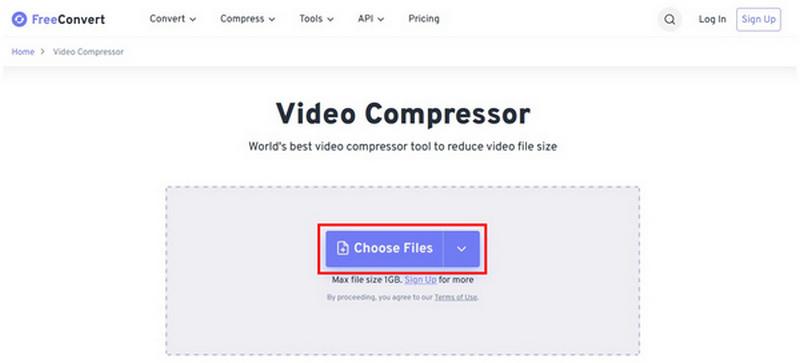
Go to FreeConvert Video Compressor Online’s website and then select Choose Files to upload the video file you want to compress.
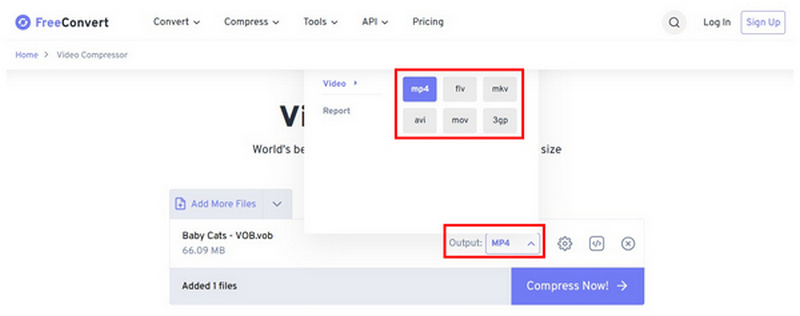
Select Output and choose the video format you want to save your file into. Unfortunately, you cannot retain the VOB format when using this option.
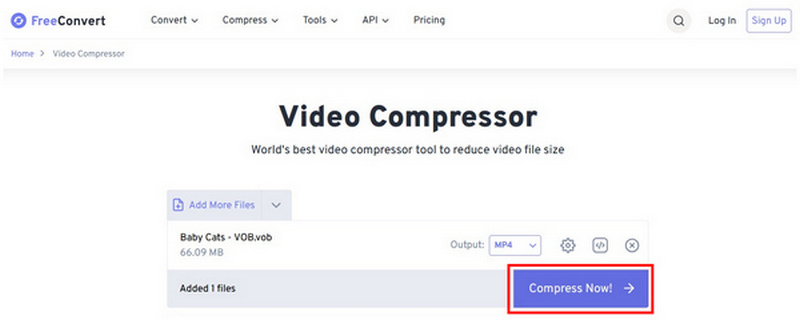
With the Output format now set, simply select Compress Now to begin the file size reduction process.
Why We Recommend It:
If you do not want to be bothered by the installation process and downloading precursors, online tools could be good enough for you. However, you have to ensure that you will prepare for the reliability issues of these programs. Compression failure is not uncommon when using the software, so you have to always expect this outcome.
Part 4. FAQs About Compressing VOB Files
What are VOB files?
VOB files are the container format of ripped DVD media. They are usually the video files inside recovered VIDEO_TS files. This makes most VOB files raw, uncompressed, and very large.
What is the average size of VOB files?
Most VOB files are at least 1 GB in size. These files are saved on DVDs, with all the data embedded. This makes them larger than files in other video formats.
Are VOB files videos?
Yes, they are. In fact, you can even convert other digital videos to VOB. However, there are no practical ways to do so.
Should I convert my VOB files to MP4?
Yes, you should. VOB files are harder to play on most multimedia players. This makes converting them to widely supported video formats worthwhile.
Is it practical to rip DVD content?
Yes, it is. This is especially true for personal DVD videos of your family. However, ripping older DVD releases may not be worth it since watching them digitally is easier.
Conclusion
Now that we have provided the best solution for our readers to learn how to compress VOB files and videos, we hope you can now convert large DVD-ripped media without any problems. If you want to ensure reliable conversions, we highly recommend using ArkThinker Video Converter Ultimate as your primary format converter. You may download it using the link below.
What do you think of this post? Click to rate this post.
Excellent
Rating: 4.9 / 5 (based on 641 votes)


