


How to Compress 4K Videos Online, on Windows, or Mac
When watching modern digital videos, 4K is the best option available today, as this resolution is best suited to modern screens such as home theaters, smart televisions, and computer monitors. Unfortunately, 4K videos are very hard to upload, making file sharing challenging when posting them to cloud storage. With that in mind, this article aims to provide the best solution for compressing 4K videos without losing too much quality, making it easier to share these files online. We will provide a detailed guide for our solutions available on browsers and desktops running Windows and macOS.

- GUIDE LIST
- Part 1. How to Compress 4K Videos Online
- Part 2. How to Compress 4K Videos on Windows/Mac Desktop
- Part 3. FAQs About Compressing 4K Videos
| 4K Video Compressors | Supported Platforms | Maximum File Size Limit | Supported Formats | Compressing Performance | Quality Retention | Watermark | Sign Up Requirement | Ease of Use |
| FreeConvert | Web-based | 1GB | MP4, MOV, MKV, AVI, WMV, WebM, FLV, and more. | File size compression, Bitrate control, Resolution resizing. | Dependent on compression settings. | No watermark. | Required for files larger than 1GB. | Beginner-friendly |
| ArkThinker Free Video Compressor Online | Web-based | 50MB – 100MB | MP4, MKV, AVI, VOB, and more. | Resolution resizing, Bitrate adjustment, Format conversion. | Maintain original video quality by default. | No watermark. | Optional | Beginner-friendly |
| ArkThinker Video Converter Ultimate | Windows, macOS | No file size limit. | MP4, MOV, MKV, AV, and 500+ media formats. | Batch compression, Bitrate adjustment, Format conversion. | Lossless quality conversion due to encoding parameters. | No watermark. | No sign-up needed. | Beginner-friendly |
Part 1. How to Compress 4K Videos Online
FreeConvert Video Compressor
To start, we recommend the FreeConvert Video Compressor, an online tool that is among the more reliable web-based multimedia tools. Unlike other online programs, this software supports larger file sizes, especially for paying consumers.
As such, it is serviceable enough for compressing your media files. Unfortunately, it cannot compress 4K videos to 720p or 1080p online for free, as the freeware version can only handle files up to 1GB. 4K videos are way larger than that limit.
To learn how to use the program for video compression and the paid upgrade options of the tool, please read our three-step guide below:
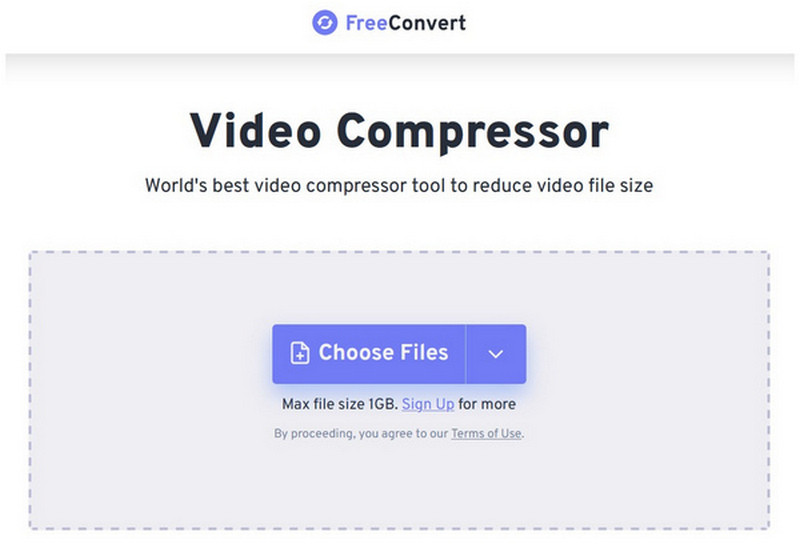
Open FreeConvert Video Compressor’s website and then select the Choose Files button.
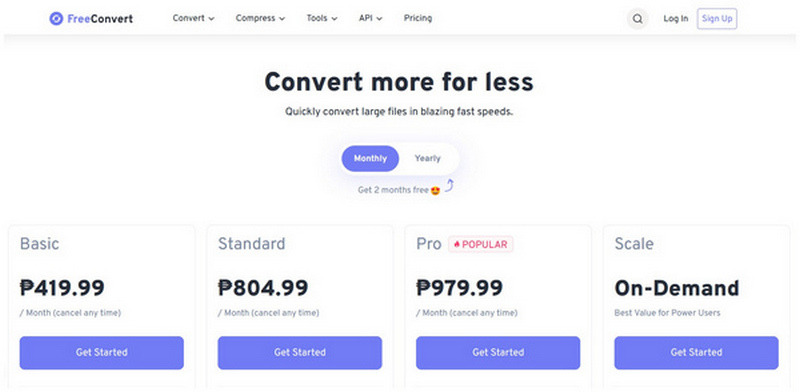
Since 4K videos will definitely be more than 1GB, FreeConvert will require you to upgrade your plan. You may choose from different plans and whether to pay monthly or yearly.
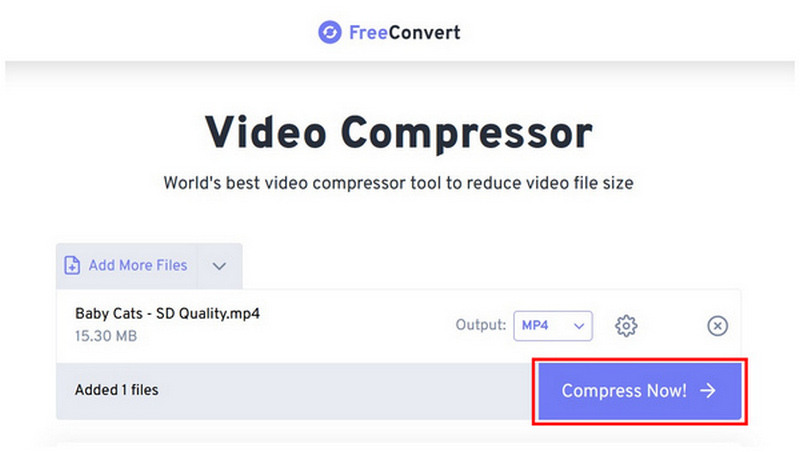
After upgrading your plan, you can now upload the 4K video to the online tool. In this guide, we will only use a sample video. Simply click Compress Now to start compressing the video file.
User Verdict:
For an online tool, most FreeConvert users are satisfied with its performance. Although its paid plans are quite pricey, its compression performance is good enough and functional for handling 4K videos.
ArkThinker Free Video Compressor Online
When looking for a tool to quickly compress videos, ArkThinker Free Video Compressor Online is another good option. Compared to the previous option, this online-based software offers a simpler video conversion process, as it does not require its users to upgrade to premium plans.
Unfortunately, compressing 4K videos online cannot be used, as it has a 100 MB per-file limit. With that in mind, we will only recommend using this online tool for reducing the file size of smaller videos meant for sharing on messaging apps.
To learn how to use the program, make sure to read our three-step guide below:
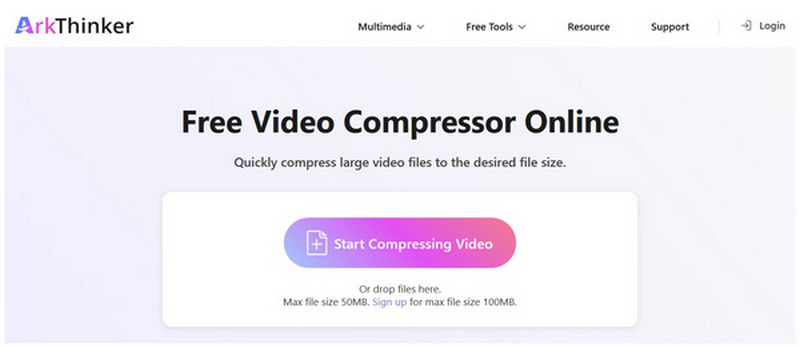
Go to ArkThinker Free Video Compressor Online’s website, then select the Start Compressing Video button.
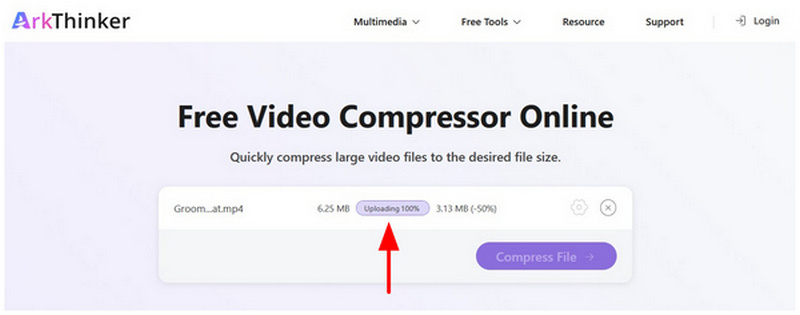
Wait for the uploading process to finish.
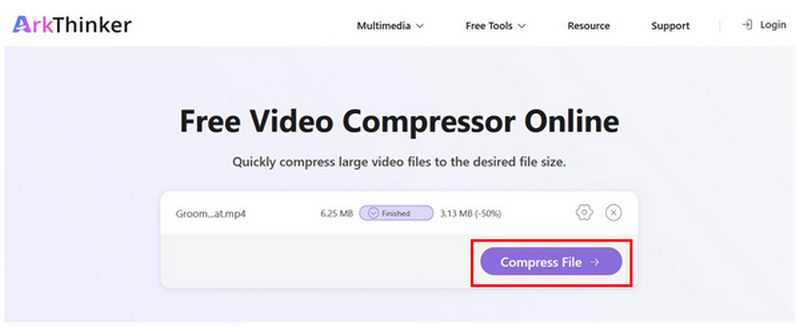
With the video file uploaded, select Compress File to start producing a lower-file-size version.
User Verdict:
ArkThinker Free Video Compressor Online is the best online tool for reducing the file size of smaller videos. It is best used if you want to meet the file size limit of messaging tools, since it can only handle 50 - 100MB video files.
Part 2. How to Compress 4K Videos on Windows/Mac Desktop
ArkThinker Video Converter Ultimate
With the limitations of online format converter tools now discussed, let us move forward to the most efficient and practical video compressor for both Windows and Mac: ArkThinker Video Converter Ultimate.
Equipped with an exclusive Video Compressor in the Toolbox section, the software offers advanced video adjustments to compress 4K media and reduce its file size. Among the advanced settings, the software can directly reduce the video file size, percentage-wise, for beginner users.
However, experienced users can also experiment with more advanced video file size settings, such as format, resolution, and bitrate. If you plan to keep the 4K resolution intact, we recommend changing only the video format and making only slight bitrate adjustments.
To learn how to use the most practical video compressor software across Windows and macOS desktops, make sure to read our three-step guide below. Make sure to download it as well for an easier time following our tutorial.
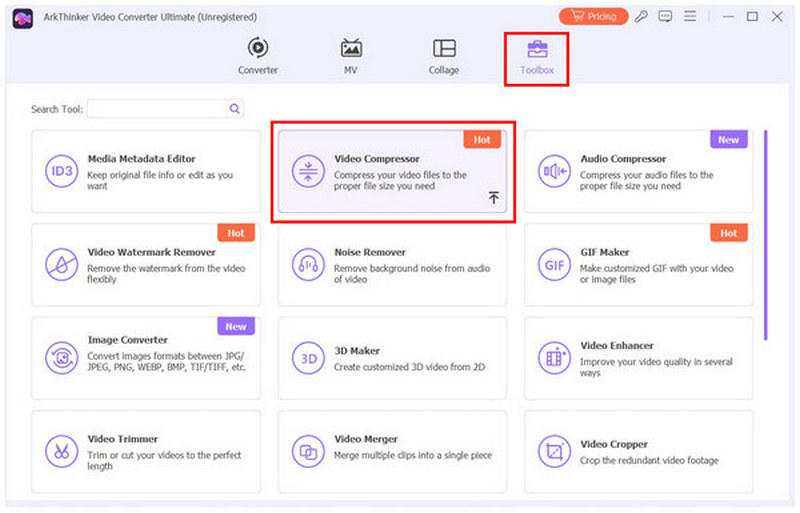
Open ArkThinker Video Converter Ultimate and then select the Toolbox tab. In the Toolbox section, select Video Compressor.
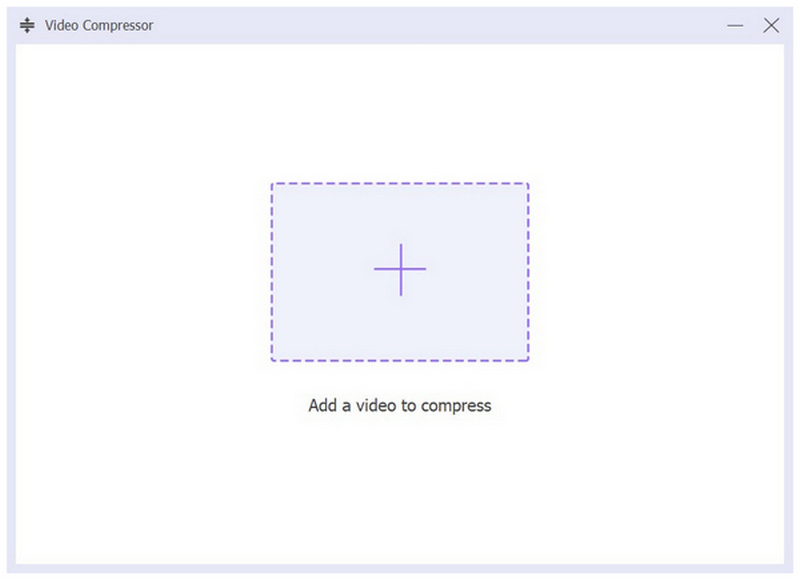
Select the "Add" button in the menu that pops up to import the video file you want to compress.
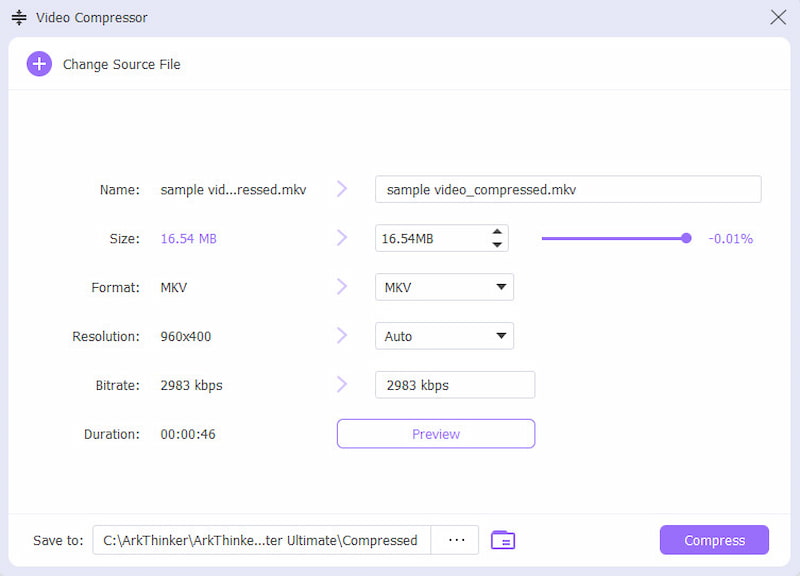
Once the video has been imported into ArkThinker Video Converter Ultimate, you can now compress the 4K video by adjusting the Size, Format, Resolution, and Bitrate of the file you are editing. Then select Compress to create the video with a smaller file size.
User Verdict:
Among the options on this list, ArkThinker Video Converter Ultimate is both the most stable and reliable compressor tool for 4K videos. First, it has no file size limit, and its performance is the best thanks to GPU acceleration. The perks are also accessible during batch conversion, making it the most practical multimedia solution for its users.
HandBrake
For an open-source, desktop-based alternative, HandBrake Video Transcoder works surprisingly well when used as multimedia-compression software. Among the options on this list, this tool is also the best for ensuring your file is as compact as possible.
This was made possible by the software’s encoder option, framerate adjustments, and the ability to set your file's quality to the lower end. If you don’t mind aggressive file compression as compensation for the reduced quality, HandBrake is a good option.
Learn how to use it using the link below:
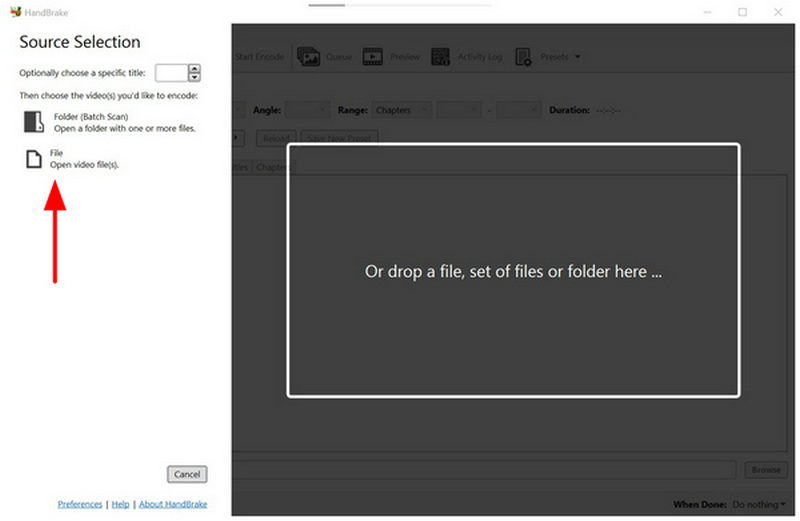
Open HandBrake and then add the video you want to compress by selecting File in the program’s main interface.
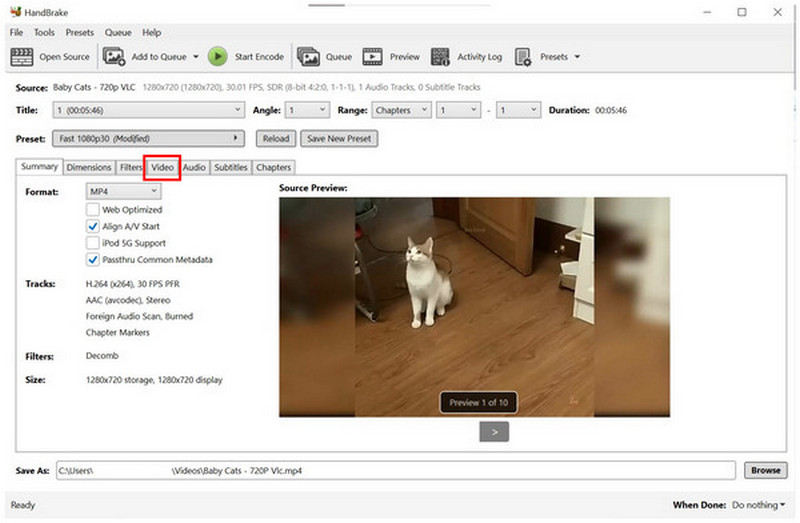
With your video now added to HandBrake, go to the Video tab.
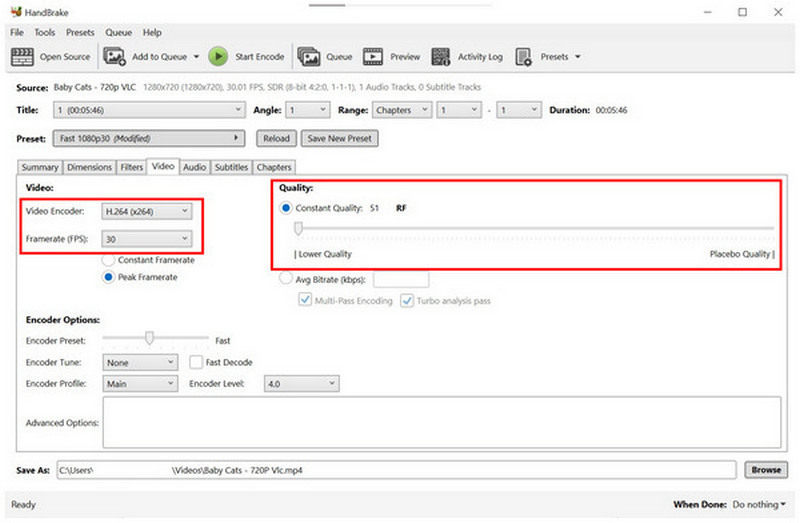
In the Video settings, set the Video Encoder to H.264 and adjust the Framerate to 30 FPS. Then set the quality slider to Constant Quality. Using this combination of settings, you can ensure your videos are thoroughly compressed. However, its quality will unfortunately decline.
User Verdict:
If you don’t mind sacrificing your video’s quality to maximize file size reduction, HandBrake’s video compression feature is a good option. However, its aggressive compression rate is not the best solution for v1ideos that are meant to be played on social media posts.
Part 3. FAQs About Compressing 4K Videos
Can I compress a 4K video to 1080p for iPhone?
Yes, you can. 4K videos can be converted to a 1080p video for iPhones. However, this is only possible on multimedia programs such as ArkThinker Video Converter Ultimate.
What is the average file size of 4K videos?
The average file size of 4K movies is around 20-30GB for raw Blu-ray rips. However, uncompressed videos may have a larger size, up to 100GB. When compressed properly, 4K may only be 6GB in size.
Are playing 4K videos hard?
It depends on the hardware on which you will watch it. 4K videos are widely supported by modern smart TVs. However, specific computer screens and media players may only play it properly on desktops.
What media player should I use for 4K videos?
Among third-party video players, VLC Media Player is by far the most popular for handling 4K videos. However, this requires a capable computer to handle playback without errors. This is because 4K videos consume a lot of graphics resources.
Is it hard to compress video files?
No, it is not. Media compression is easy to do. There are also multiple options available, from online tools to desktop software.
Conclusion
Now that we have provided the best programs to compress 4K videos for easier file transfer and upload, we hope you can store more high-quality videos without worrying about storage. This is also a perfect solution for more efficient file sharing using cloud services. Among the options on this list, we highly recommend ArkThinker Video Converter Ultimate, which you can download using the link below.
What do you think of this post? Click to rate this post.
Excellent
Rating: 4.8 / 5 (based on 505 votes)


