


Full Review of CopyTrans HEIC Converter: Is It Safe to Use
Among Windows users, opening HEIC images can be challenging because the operating system does not natively support this file type. Fortunately, HEIC converters are a popular solution for this problem. Among them, the CopyTrans plug-in is one of the more popular options for PC users, since it can be used directly in File Explorer. In this article, we will provide a detailed review of CopyTrans HEIC Converter, offering our readers a complete overview of the plug-in’s key features, strengths, limitations, and overall performance.

- GUIDE LIST
- Part 1. What Can CopyTrans HEIC Converter Do
- Part 2. Copytrans HEIC Converter - Performance
- Part 3. Best Free Online Alternative for Better Control
- Part 4. FAQs About CopyTrans HEIC Converter
How We Test and Review
- • We converted a small batch of 5 HEIC files using the CopyTrans plugin in the File Manager.
- • The total conversion time was measured to assess Copytrans’s processing speed and performance.
- • We used genuine user reviews and test results to craft an objective Pros and Cons list.
- • We provided some of the most notable features in the software that are essential for HEIC conversion.
- • The quality of the converted HEIC image using CopyTrans was compared side by side with our featured online alternative tool.
Part 1. What Can CopyTrans HEIC Converter Do
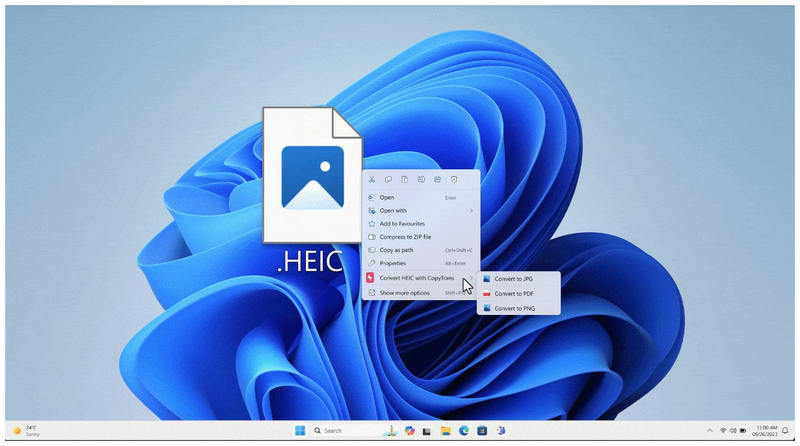
Unlike other GUI-based multimedia management tools, CopyTrans HEIC Converter is a plug-in that integrates into your computer’s main menu. As such, all you need to do is right-click your HEIC image and select the CopyTrans option from the menu.
Due to its design, CopyTrans is one of the most efficient tools for JPG conversion. Unfortunately, this comes at the cost of a required setup and installation before it can be used. To learn more about using CopyTrans to convert HEIC to JPG , make sure to read its key features, strengths, and limitations.
Key Features:
- • Installed as a plug-in to the Windows menu.
- • No GUI and complex editing tools.
- • Straightforward and very simple to use.
- • Instant image format conversion.
- • Enabled HEIC support for other Windows software on your desktop.
- Free and lightweight software.
- Extremely quick and practical conversion process.
- Operates within the Windows interface and menu.
- Opens HEIC files previously unsupported by Windows OS.
- Maintains the original metadata of converted JPGs.
- Zero photo editing features.
- Its lack of a GUI makes it intimidating for beginners.
- Only converts images to the JPG format.
- It has a limited batch conversion count of only 100 images per conversion.
- Tricky to install and set up.
Part 2. Copytrans HEIC Converter - Performance
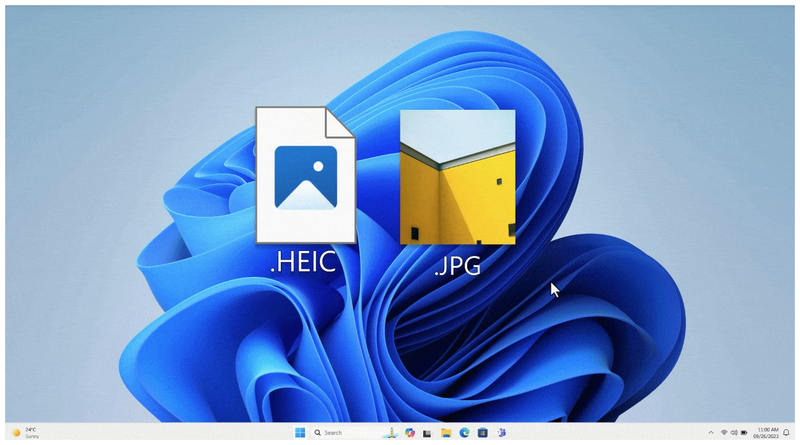
With the main features of CopyTrans HEIC Converter now discussed, let us now proceed to specific performance measurements available in the program. In this section, we will discuss the tool’s capabilities in terms of efficiency, quality retention, and its supported formats.
Conversion Speed
Conversion speed is one of CopyTrans’ biggest strengths. Since it is integrated into your system, you can also use keyboard shortcuts to select the HEIC files you want to convert quickly, then use the Convert with CopyTrans function from your menu. The software’s background will also enable it to utilize your PC’s resources fully.
Quality
When it comes to quality retention, CopyTrans is also a good pick. It can preserve both the image quality of your HEIC file and all the EXIF and metadata available in your media. This makes the program an excellent choice for users who want to maintain image quality during format conversion.
Supported Output Formats
Since CopyTrans HEIC is an exclusive HEIC converter software, it offers limited support for other output formats. It can only convert HEIC files to JPG and nothing more. However, this is not a limitation, as the JPG format is the safest file type for converting unconventional image files.
Part 3. Best Free Online Alternative for Better Control
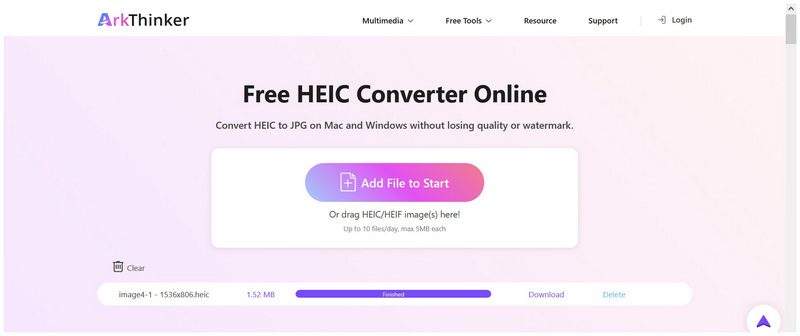
Although CopyTrans HEIC Converter is fast and easy to use once installed, the setup requirements and installation process for a third-party plug-in may be challenging for beginner multimedia editors. Fortunately, web-based alternatives like Arkthinker Free HEIC Converter Online are a solid solution for this issue.
In addition to having a functional graphics user interface, ArkThinker’s HEIC converter tool is also fully online. As such, it does not require any complex downloads, installations, or setup before you can use it to convert your HEIC files. It also helps that its interface is very intuitive and well-labeled, making its design optimized for beginners.
This was made possible by the software’s extremely intuitive user experience. Files uploaded to the tool will be automatically converted to JPG, and it can handle up to 10 images in a batch.
The ease of use and intuitive design of ArkThinker Free HEIC Converter Online made it a solid choice for amateur practitioners or users who prefer quick, easy format conversion, all without any installation or setup.
Part 4. FAQs About CopyTrans HEIC Converter
How to install CopyTrans HEIC Converter?
CopyTrans has a downloadable setup program from its website. You can download the software and follow the setup requirements to use it. However, make sure only to get the installation wizard from their official site.
Can I open HEIC files on Windows computers?
No, you cannot. Windows computers cannot open HEIC files by default. You need to open advanced software to access these files.
Is it hard to open HEIC images outside the Apple ecosystem?
Yes, it can be. Most operating systems other than Apple’s do not support HEIC. It is more common on Windows computers, but some Android smartphones can open these images.
Is CopyTrans a Windows exclusive?
Yes, it is. Copytrans is only available on Windows computers. It is an exclusive.
Should I convert my HEIC image to JPG?
Yes, you can. Converting to widely supported formats, such as JPG or PNG, is a good option to make HEIC images more accessible. This is why JPG is often the default format among HEIC converters.
Conclusion
Now that we have reviewed the capabilities and limitations of CopyTrans HEIC Converter, we hope this article has provided you with useful information to help you choose the HEIC converter that best suits your needs. If you want a no-installation solution, consider using ArkThinker Free HEIC Converter Online, a solid alternative for users looking to avoid setup or installation when converting HEIC to JPG.
What do you think of this post? Click to rate this post.
Excellent
Rating: 4.8 / 5 (based on 455 votes)


