


How to Use HandBrake to Compress Videos to Reduce File Size
When it comes to video file management, HandBrake is one of the more popular options, as it is well-known for being a software that can convert DVD video files into digital copies. However, the program was designed to provide more options than its primary design. With that in mind, this article guide will focus on learning how to use HandBrake to compress a video, providing our readers with everything they need to reduce the file size of videos in HandBrake.

- GUIDE LIST
- Part 1. Can HandBrake Compress Video
- Part 2. How to Compress Video in HandBrake for Upload and Email on Windows/Mac
- Part 3. Can You Use HandBrake to Compress a Video Online Free
- Part 4. Best Alternative to HandBrake Video Compressor
- Part 5. FAQs About Compressing Video on HandBrake
Part 1. Can HandBrake Compress Video
Yes, it can. HandBrake is a suitable option for compressing videos, offering features that enable you to edit the codec, quality, and resolution of your videos. All of these factors are designed to ensure that your video will have a smaller file size once it is encoded. This makes the program an ideal tool for compressing videos for Discord, Email, or social media uploads. Unfortunately, the aggressive compression used by the program results in a significant decline in the quality of these files.
Part 2. How to Compress Video in HandBrake for Upload and Email on Windows/Mac
To learn how to compress videos and discover the optimal settings for compression in HandBrake, read our three-step guide below, which includes the best HandBrake settings for video compression and suitable video quality.
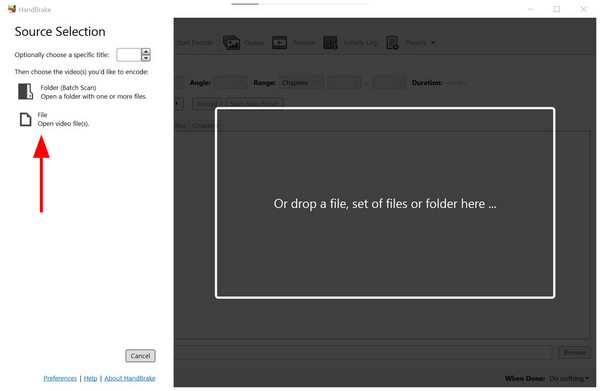
Open HandBrake and then select File to import the video you want to compress.
Once your video has been importer to HandBrake, select the Video tab.
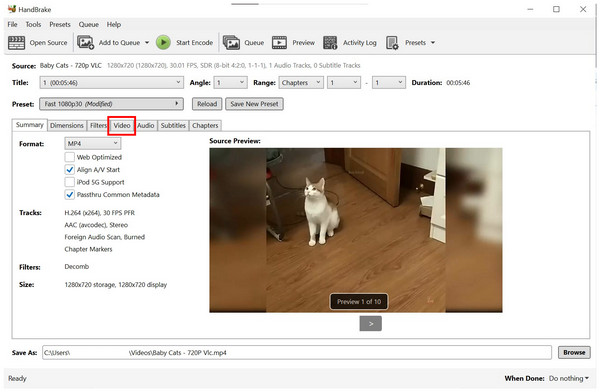
In the Video tab, set the Video Encoder to H.264 and the Framerate to 30 FPS , and turn the quality slider to Constant Quality . These settings are typically the most effective in minimizing file size; however, they often compromise video quality.

With these steps, you can now ensure that your video can be compressed. However, be aware that the video quality is significantly reduced when videos are compressed in the program.
Part 3. Can You Use HandBrake to Compress a Video Online Free
No, there is no official online version for HandBrake. This feature is not necessary since HandBrake has flexible cross-platform availability for Windows, Mac, and Linux computers. You can simply download the tool and then use it offline on your device after installation. Simply put, Handbrake cannot compress videos online .
Be sure to keep this in mind, as some online tools replicate HandBrake’s logo and branding. These browser tools are not officially supported platforms, and there’s a risk that they may leak your information.
If you are looking for an alternative to HandBrake, consider ArkThinker Video Converter Ultimate instead. To learn more about this alternative option, please read our brief review and guide below.
Part 4. Best Alternative to HandBrake Video Compressor
Since HandBrake has a significant downside due to its complex design, using an alternative that is easier to use and way simpler to navigate should be your top option. In this case, ArkThinker Video Converter Ultimate should be one of your top considerations.
Equipped with a dedicated Video Compressor tool, this cross-platform program for Windows and Mac works great for easily compressing video files using a simple compression rate slider. This provides users with the option to accurately compress videos at a specified rate.
Additionally, manual editing options are also available in the tool. You can manually change your video’s format, resolution, and bitrate for more controlled file size reduction. To ensure that your file’s quality remains passable, the program also offers a preview tab, providing an option to check whether your compression settings are not too harsh.
To learn more about what makes ArkThinker Video Converter Ultimate a solid choice, make sure to read its main features below and refer to our three-step guide.
Main Features:
- Equipped with a beginner-friendly video compressor tool for applying easy adjustments.
- Offers format conversion features that can improve the compression rate of videos.
- GPU-accelerated and processes videos way faster than HandBrake.
- Percentage-based compression option for more controlled file size reduction.
- It can preserve the quality of videos that have been compressed.
For an easier time following our tutorial, please download the ArkThinker Video Converter Ultimate first.
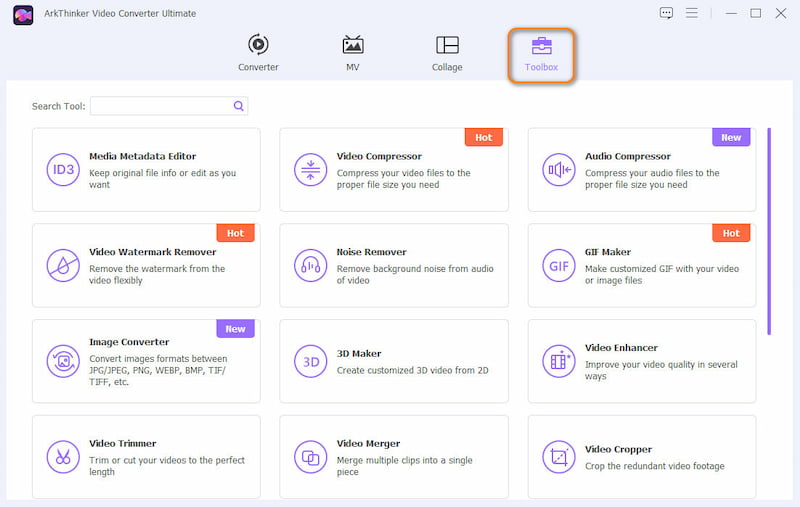
Open ArkThinker Video Converter Ultimate and then proceed to the Toolbox option. Then, select the Video Compressor tool.
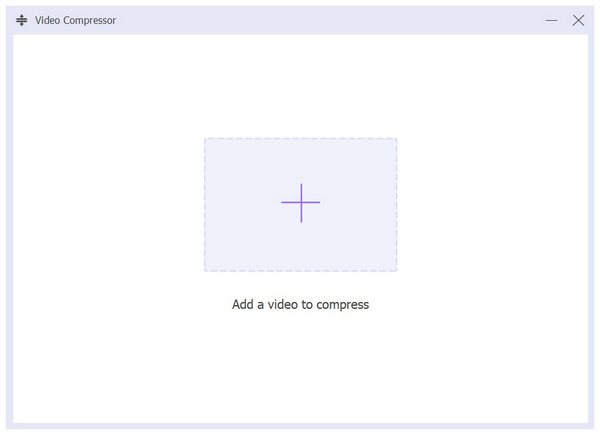
After selecting the Video Compressor option, click the Add File pop-up to select the video you want to compress.
Once the file you want to compress has been added, you can now compress your video file using the Compression Slider. For manual adjustments, you can also change the Format, Resolution, and Bitrate of the program. To begin the process, simply click Compress.
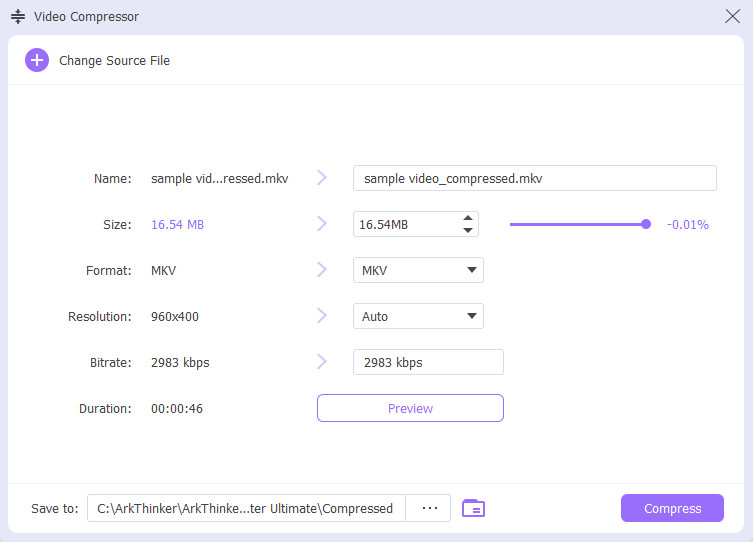
With the video compression option in the best HandBrake alternative now discussed, we hope that ArkThinker Video Converter Ultimate will be a good choice for you when selecting a video compression software if you think that compressing video size in HandBrake is too complicated .
Part 5. FAQs About Compressing Video on HandBrake
Is HandBrake easy to use?
No, it is not. HandBrake is very technical to use. It requires significant skill to use properly.
Should I use HandBrake to compress videos?
Yes, you may. HandBrake can be used as a video and MP4 compression tool. However, it works by manually adjusting the video quality, rather than compressing it directly.
Can compressing videos reduce their quality?
Yes, this may happen. Since video compression edits the video itself, its quality is a common payoff for the smaller file size. You need to find the balance between quality and compression settings to avoid quality reduction when compressing videos with HandBrake on Mac or Windows.
Is it worth using HandBrake for video management?
Yes, you may. HandBrake was specifically designed for this purpose. You can convert DVD videos digitally or change the format of digital files. These two options are the primary tools for the program.
What is the best HandBrake alternative?
The best alternative to HandBrake is a multimedia editing program. One example is ArkThinker Video Converter Ultimate. This option offers similar features to HandBrake, but it is way easier to use.
Conclusion
Now that we have learned how to use HandBrake to compress videos. We hope that this article has provided you with valuable information to help you choose the compressor tool that best suits your file management and video editing needs. When it comes to alternative options, make sure to check out ArkThinker Video Converter Ultimate and take the first step by downloading the program with the link below.
What do you think of this post? Click to rate this post.
Excellent
Rating: 4.8 / 5 (based on 491 votes)


