


2 Ways To Compress a Video for Twitter: Online and Desktop
When uploading Twitter videos, one of the most common issues users face is the reduced video quality due to the file size limits. With that in mind, a common problem on Twitter is how to upload videos while maintaining high quality and ensuring smooth playback. In this article, we will feature two of the best tools you can use to learn how to compress a video for Twitter to avoid drastic resolution loss and ensure playback preservation.

- GUIDE LIST
- Part 1. Twitter Video Upload Limits
- Part 2. How to Compress Video for Twitter
- Part 3. FAQs About Compressing Videos on Twitter
Part 1. Twitter Video Upload Limits

Before featuring the best tools to compress your videos for Twitter (X), let us first discuss why it is smart to compress your media files before uploading them to the social media platform. Simply put, media files you can upload to Twitter have limitations on file size, video length, and supported upload formats.
With that in mind, you have to ensure that the files you will share on the website meet these limits to avoid upload errors and ensure a smooth, delay-free process.
To learn the upload limits of videos on Twitter, make sure to read our table below covering the platform’s media upload guidelines in terms of file size, video duration, and formats.
| Max File Size | 512MB |
| Max Video Duration | 2:20 Mins (140 seconds) |
| Supported Formats | MP4, MOV |
Relatively speaking, Twitter’s 512 MB file size limit for videos is serviceable, especially given the 2 minutes and 20 seconds duration cap. However, due to the lack of quality restriction, this file size may be considered limited. As such, it is common for Twitter users to seek video compression tools to work within the social media site’s limitations.
With that in mind, two of the software programs we have featured below will solve this problem regarding maximum file size.
Part 2. How to Compress Video for Twitter
Compress Online for Free - ArkThinker Compressor Online Free
When it comes to quick-and-easy file compression, online tools may be the best choice, as they offer excellent ease of use and accessibility. Among the competitive web-based options, ArkThinker Free Video Compressor Online should be your number one choice.
Compared to other online tools, this program has a strong advantage in supported formats, as it can compress widely used files, such as MP4, MOV, MKV, and AVI. It also offers practical compression templates that give its users a wide range of resolution options, including 360p, 720p, and 1080p.
Although it is limited in its ability to preserve quality, since it moderately reduces the original quality of your video, this might be worth it since it makes up for it with fast exporting.
Now that we have discussed the best features and limitations of using ArkThinker Free Compressor Online, we can conclude that it works best as a quick fix for meeting Twitter’s file size limits.
To learn how to use the program, make sure to read our three-step guide below detailing the process you have to do when compressing videos online using the tool:
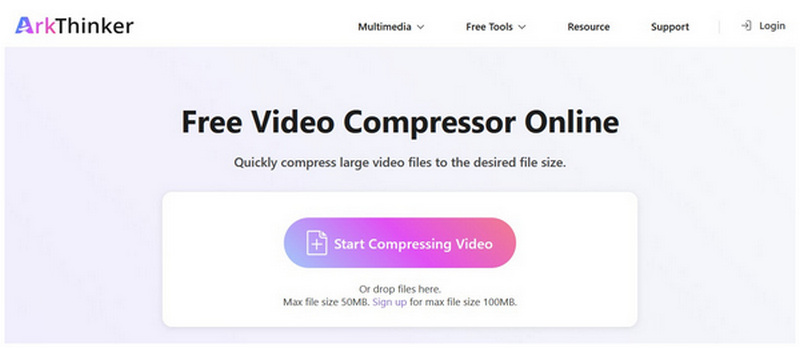
Open ArkThinker Free Video Compressor Online’s website, in the main menu, select the Start Compressing Video option.
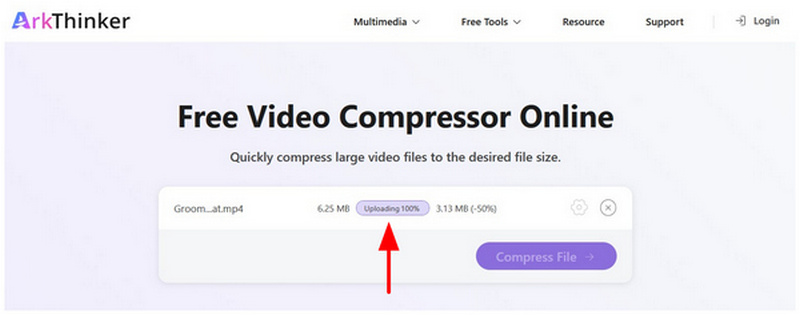
Once the Twitter video has been imported, wait for the uploading process to finish.
With the video now uploaded, select Compress File to start compressing your media file for a more efficient upload.
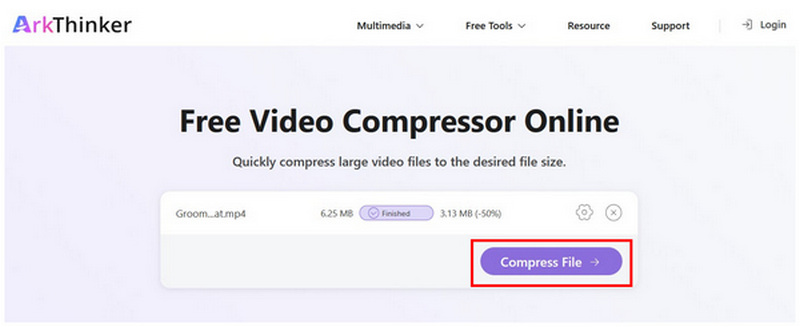
Due to the sheer simplicity of this option, compressing videos for Twitter for free online is now made easy. However, this is at the expense of lesser compression settings. Fortunately, this is a good trade-off for beginners who are only looking to reduce the file size of their Twitter media.
Compress with No Quality Loss - ArkThinker Video Converter Ultimate
If you want to ensure your videos have no quality loss when compressed to meet Twitter’s 512MB file size limit, a desktop-based solution is exactly what you need with ArkThinker Video Converter Ultimate.
Unlike its browser-based counterpart, this desktop-based program uses your device’s resources, allowing it to support 1000+ media formats without issue. This also allowed it to have more precise control over the video compression process.
As such, the program now includes advanced settings in its Video Compressor tool, including Compression Rate, Format, Resolution, and Bitrate. All of which are optimized to provide precise control to the user, compressing their Twitter media.
Unlike its online version, ArkThinker Video Converter Ultimate can preserve the original quality of files processed while ensuring that compression speed is not penalized. This was due to the software’s GPU-acceleration feature, which allowed it to batch-process, apply adjustments, and compress video simultaneously.
To learn the best tool you can use for Twitter video compression, make sure to read our three-step tutorial below featuring the Video Compressor tool of ArkThinker Video Converter Ultimate.
Do not forget to download it as well for an easier time learning how to use the program.
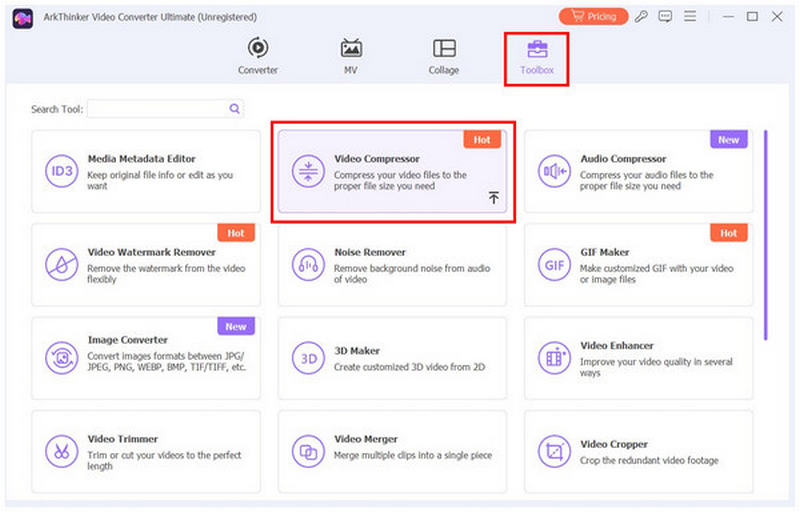
Open ArkThinker Video Converter Ultimate then select Toolbox to access more multimedia tools in the program. Then, choose the Video Compressor tool.
Wait for the upload pop-up to appear on the screen, then select the Add button to import the Twitter video you want to compress.
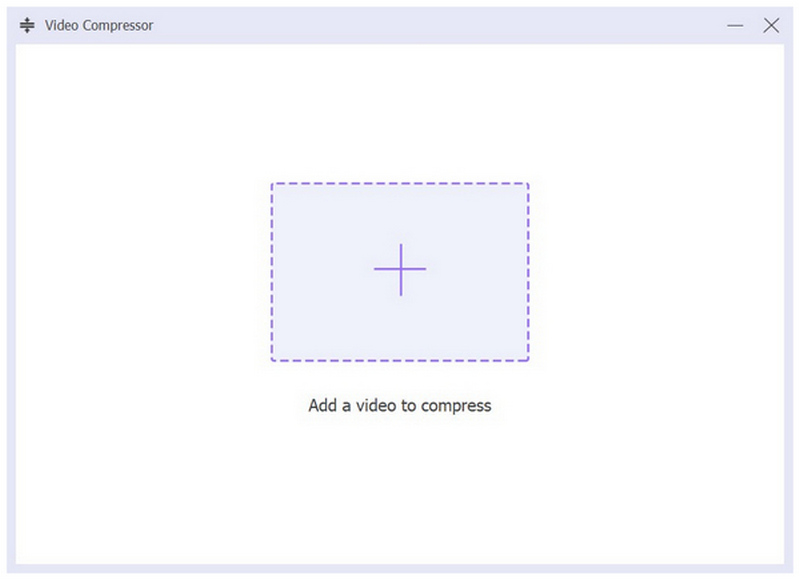
Once the file has been added to the Video Compressor tool, you can now reduce its file size by adjusting the Compression Rate, Format, Resolution, and Bitrate. Finally, select Compress to produce the video now optimized for Twitter.
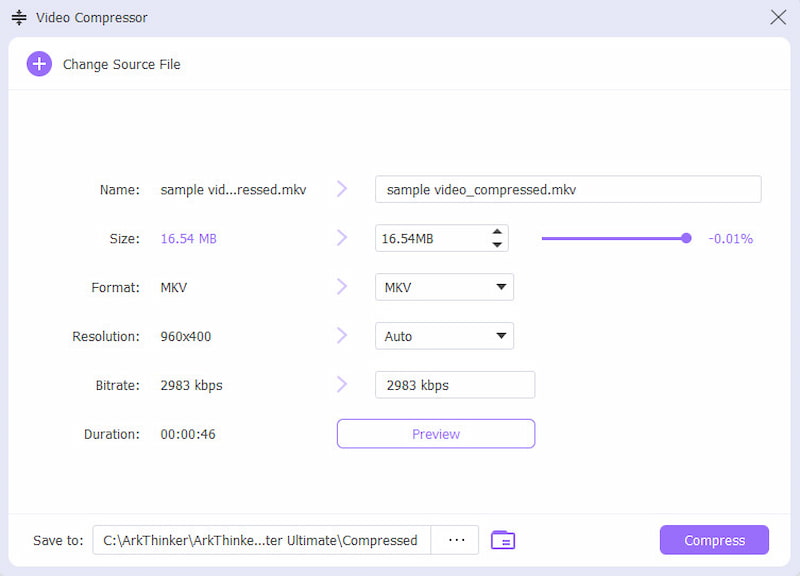
When compressing videos for your Twitter content with ArkThinker Video Converter Ultimate, use the built-in format settings in the Video Compressor tool. This is a good addition, since you can use it directly to convert any video to MP4 or MOV for a supported Twitter upload.
Part 3. FAQs About Compressing Videos on Twitter
What is Twitter’s maximum file size upload for free users?
Twitter has two different upload limits for free and paid users. Free users have an upload limit of 512MB. For paid, the limit is extended to 8GB.
Can I upload a 5-minute video on Twitter?
No, you cannot. Free Twitter users can only upload a video up to 2:20 (140 seconds). However, premium users can share files for up to 2-3 hours.
Is it hard to compress videos for Twitter uploads?
No, it is not. There are numerous compression options available. There are third-party tools, such as ArkThinker Video Converter Ultimate, and built-in solutions, such as 7-Zip.
Can I post MKV videos on Twitter?
No, Twitter does not support MKV uploads. You can only upload MP4 and MOV videos. This makes format conversion needed for some videos.
Does Twitter have a resolution limit for videos?
No, it does not. Twitter has an undefined resolution limit for videos, allowing uploads of 720p to 1080p. However, it has a strict limit on file size and duration.
Conclusion
Now that we have provided our readers with a guide on how to compress video files for Twitter uploads, the solutions we have discussed will greatly improve your content on the platform. To ensure quality preservation, we highly recommend using ArkThinker Video Converter Ultimate, available for download via the link below.


