


Top 3 Camtasia Alternatives in 2026: Pros, Cons, Best Uses
Screen recordings are one of the most versatile multimedia solutions for modern computers. Among screen recorder programs, Camtasia is one of the most reliable third-party options. Unfortunately, common issues such as heavy resource usage and pricey premium plans make looking for a Camtasia alternative a common inquiry online. To address this demand, this article will present three practical screen recorder alternatives that match Camtasia’s capabilities. We will provide the best uses, pros, and cons of these recording tools to help our readers choose the one that suits their needs.

How We Tested and Reviewed
- • We tested the performance of Camtasia and the three alternatives on a modern Windows 11 computer.
- • The desktop used for testing is equipped with an Intel i7 processor, 16GB RAM, and an integrated GPU.
- • During performance assessment, we ensured that only the recorder being tested was active on the device.
- • After recording, the quality of the screen-recorded videos was compared and assessed.
- • Each software’s post-processing capabilities were also compared by reviewing its annotation tools and video editing features.
| Screen | Screen Recording | Video Editing | Annotation Tools | Supported | Price |
| Camtasia | • Full-screen • Window • Region • Webcam • Microphone • Scrolling Screenshot | • Multi-track editing • Video trimmer • Video transitions • Cursor effects • Audio Editing | • Callouts • Arrows • Shapes • Text • Highlights • Cursor effects • Blurs | Windows macOS | $39.00 – $599/00 |
| ArkThinker Screen Recorder | • Full-screen • Custom region • Window • Webcam • Game Recorder • iOS/Android Recorder • Audio | • Trim/Split • Video Merger • Video Compressor • Format Converter • Metadata editing | • Text • Lines & Arrows • Callouts • Drawing tools • Highlights • Live annotations during recording | Windows macOS | Free – $19.96 |
| ScreenFlow | • Full screen • Partial screen • Window • Webcam • Microphone • iPhone/iPad | • Multitrack editing • Transitions • Text animations • Filters • Stock media library | • Freehand annotations • Shapes • Lines/Aarrows • Callouts • Zoom • Highlight | macOS | $199.00 – $298.00 |
| ActivePresenter | • Full screen • Custom Region • Window • Webcam • Microphone/System audio | • Cut/Split • Video merger • Speed/Volume changer • Freeze frames • Multitrack editing • Transitions • Zoom & Pan | • Shapes • Callouts • Captions • Highlights • Arrows and Lines • Zoom/Pan • Gesture effects • Captions | Windows | Free – $499.00 |
Part 1. Top 3 Camtasia Alternatives
Top 1. ArkThinker Screen Recorder
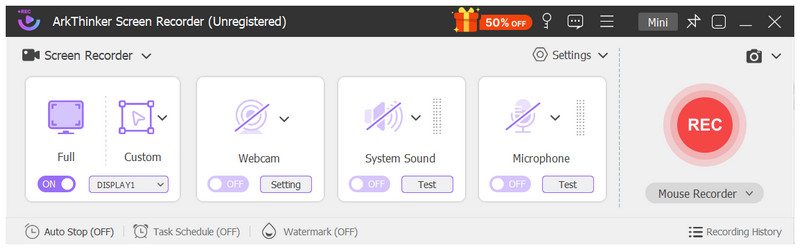
Best Uses: Users looking for an affordable alternative and versatile screen recording modes.
User Rating: 5/5 Stars
To start our list of recommended Camtasia Studio alternatives, we have the most versatile and balanced screen recorder on the market: ArkThinker Screen Recorder. Designed exclusively as an all-in-one screen recorder, the software offers 7 recording modes, providing users with a versatile set of options.
Among these screen recording tools, its most notable modes are the standard full-screen recorder, the custom region recorder, and the dedicated game recorder, making it highly practical for users seeking a range of recording options.
Due to its versatility, we highly recommend using the program whether you want to save videos for offline use, capture lectures for online tutorials and seminars, or capture high-performance gaming footage for content production.
To start using the most balanced Camtasia alternative of our three featured options, download ArkThinker Screen Recorder.
- Its paid versions are more affordable than Camtasia’s pricing plans.
- Beginner-friendly and well-labelled interface design.
- Equipped with a total of 7 recording modes.
- Supports live annotation during recording.
- Cross-platform availability for Windows and macOS.
- Basic editing tools compared to Camtasia.
- Fewer templates and editing assets than other recorders.
- Its free version has slightly limited features.
Top 2. ScreenFlow
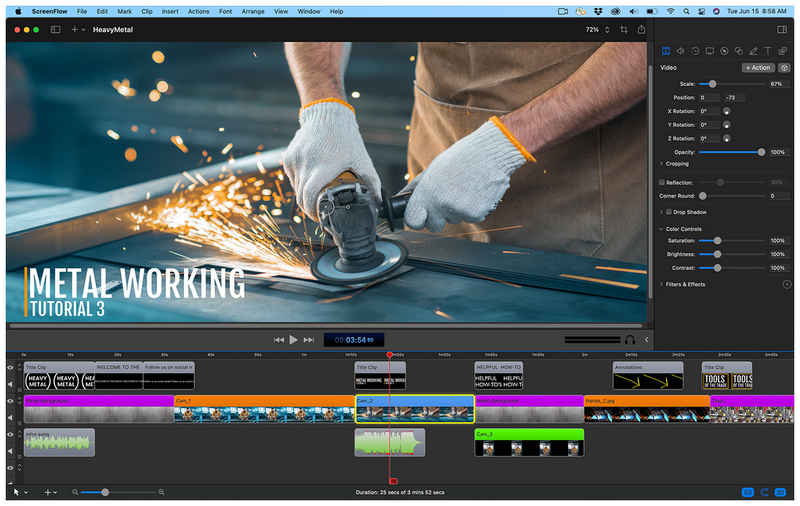
Best Uses: Users looking for an upgrade over the basic QuickTime screen recorder for macOS desktops.
User Rating: 4/5 Stars
Moving on to the next Camtasia competitor, we have the ScreenFlow screen recorder, an exclusive macOS option for users looking to upgrade from the basic QuickTime recorder.
In addition to being highly optimised for macOS devices, this alternative offers a significant advantage over Camtasia and other options on this list for advanced video editing. Although it was designed as a screen recorder first, it features multi-track timeline editing for traditional editors.
As such, this macOS-exclusive is a good option if you want a recorder tool that can cut your video-editing work in half.
- Built exclusively for macOS and devices.
- Multi-track timeline editing.
- Advanced annotation tools and video editing options.
- Only available for macOS.
- Expensive price tag compared to other premium screen recorder options.
- High resource consumption when used on older Mac computers.
Top 3. ActivePresenter
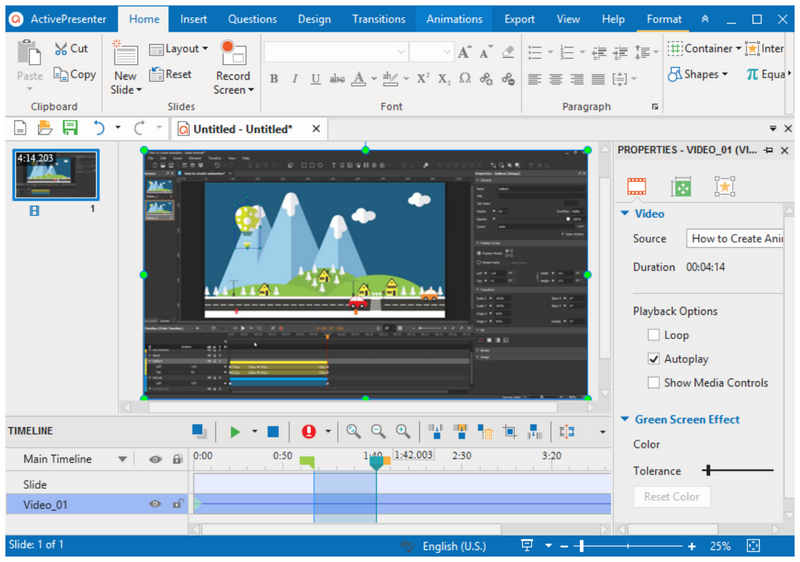
Best Uses: Lecturers and educators looking to record classes and create educational content.
User Rating: 4/5 Stars
Moving forward, the third recommended tool and another reliable free Camtasia alternative we will highlight is ActivePresenter. If the two previous options are balanced in ArkThinker and focused on video editing in ScreenFlow, this screen recorder option is specifically designed as screen recording software for capturing lessons and tutorials.
As its name suggests, ActivePresenter is especially optimised for presenters who will often want to create software tutorials, seminars, and educational discussions. The software is designed for modern eLearning.
However, its most compelling feature is that the free version of the software is enough to make it reliable for free users. This makes the tool an accessible solution for online-based educators and recording webinars.
- Its free version offers the key features for educational screen recordings.
- No watermark even on the free version.
- Its features, editing options, and annotation tools are made for educators.
- Complex and technically demanding interface.
- Suboptimal as a general screen recorder.
- Its exclusive features made for educators may be overwhelming for casual screen recordings.
Part 2. FAQs About Camtasia Alternatives
Are there reliable free alternatives to Camtasia Studio?
Yes, there are. Among the options on this list, both ArkThinker Screen Recorder and ActivePresenter have reliable free versions. Simply select whether you want balanced features or a dedicated tool for producing video tutorials.
What Camtasia Studio competitor can be used as an alternative?
Most screen recording tools can serve as alternatives to Camtasia. All you have to do is consider what you like most about the program. If you prefer the versatility of recording modes, we recommend ArkThinker Screen Recorder.
Can I record online videos with screen recorders?
Yes, you can. Most desktop-based recorders can capture videos with no problem. However, browser extension recorders usually cannot bypass encrypted videos.
How much are Camtasia Studio plans?
Camtasia has a wide selection of paid plans. However, the most popular option is the Essentials Plan, which costs $179.88 annually. This plan comes with the core screen recorder, video editor, and audio editor features.
Should I use Camtasia for creating video tutorials?
Yes, you can. Camtasia has enough features to make it a good recorder for tutorial videos. In fact, producing professional tutorials and video lectures is one of the program’s key strengths.
Conclusion
Now that we have reviewed the most reliable Camtasia Studio alternatives for 2026, we hope you can select the program that fits best with your needs. For balanced recording modes, select ArkThinker Screen Recorder. For users who want an optimised tool for macOS, we recommend ScreenFlow. Finally, for educators and tutorial video production, use ActivePresenter. If you are unsure which of them works best, we highly suggest using the balanced option in ArkThinker Screen Recorder, which can be downloaded using the link below.
What do you think of this post? Click to rate this post.
Excellent
Rating: 4.9 / 5 (based on 748 votes)


