


How to Download Udemy Videos: A Full Tutorial in 2026
Upskilling has become accessible today due to online courses that users can take from the comfort of their homes. Among online learning platforms, Udemy is one of the most notable options. Unfortunately, it has issues downloading videos, since it mostly saves lectures offline, which is far from downloading. In this article, we will provide three solutions that you can use to download Udemy videos to your local files directly. We will provide tutorials on saving Udemy lectures, including the built-in options in the program, as well as a third-party solution that provides direct download support for desktop and mobile devices.

- GUIDE LIST
- Part 1. Can You Download Udemy Videos
- Part 2. Official Udemy Rules for Offline Course Viewing
- Part 3. 3 Ways to Watch Udemy Courses Offline
- Part 4. Legal Considerations When Saving Udemy Course Content
- Part 5. FAQs About Downloading Udemy Videos
Part 1. Can You Download Udemy Videos
Officially, you cannot. Udemy’s download option works more like saving the program for offline viewing and is far from being considered a direct download. Compared to other programs, downloading Udemy videos for offline viewing works similarly to how it does on Spotify and Netflix. The media will be accessible offline, but it will not be saved locally on your device.
Additionally, downloading Udemy videos for offline use is only available in the program’s mobile version. If you only use Udemy in a browser, the download option will be available only if the lecturer has made it so.
With that in mind, if you want to learn whether you can download Udemy videos, you unfortunately cannot. However, if offline access is good enough for you, Udemy’s download feature should be enough.
Part 2. Official Udemy Rules for Offline Course Viewing
Unfortunately, Udemy’s policy of providing offline access only via its app is an official rule of the learning platform to protect its lecturers’ content. This is their primary measure to prevent content from being reproduced and to protect their lecturers from piracy.
As a result, Udemy content saved in the app is heavily protected and scrambled within the app’s data. When saved to the desktop, the videos are heavily encrypted and not saved as a generic video file.
Now that we have addressed the accessibility of downloaded Udemy videos, we hope you have learned where you can download Udemy videos on a laptop. Despite these answers, you still have three methods that you can use to download Udemy videos indirectly. The options we have provided below include two official options and one practical bypass to watch Udemy videos for personal use, along with one of the best screen recorders for Windows 11.
Part 3. 3 Ways to Watch Udemy Courses Offline
Method 1: Use the Udemy Mobile App Offline Download Feature
The first method in this article will be the official download option in Udemy’s mobile app. This is the primary download and offline access solution officially available on Udemy. If you are familiar with Spotify’s download function, it works similarly.
To learn how to use the offline download feature on the Udemy mobile app, please read our guide below.
Open the Udemy Mobile App and find the course you want to enrol in. Then, select the Enrol Now button on the introductory page of the course you selected.

Once you are enrolled in the course, select the same button, now labelled Go to Course.

In the course’s main menu, the mobile app Udemy will give you access to download buttons for each lecture. Simply select the Download button for the lectures you want to save offline.
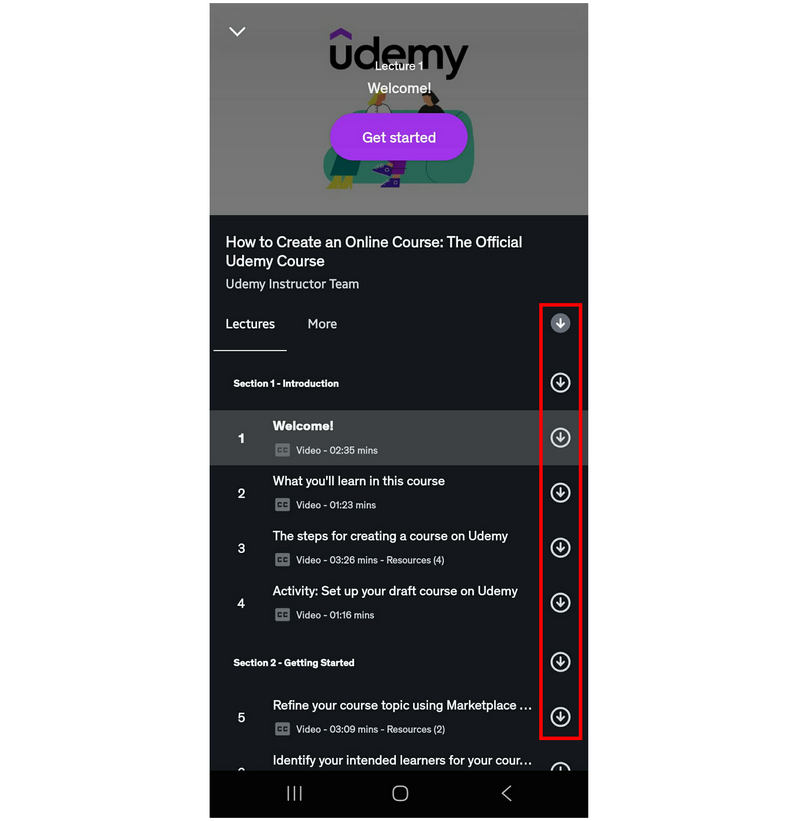
Unfortunately, Udemy’s offline option does not directly download the lecture videos. It works more like Spotify’s download option, which only lets you watch content you’ve downloaded within the app.
Method 2: Access Udemy Courses Through Browser Offline Solutions
Although the download option in Udemy’s browser is not as straightforward as in the mobile app, the web-based version still offers an offline download option. However, it is much more limited than the Udemy mobile app.
On Udemy’s website, go to the course you want to enrol in. Then, click on Enrol Now.

After selecting Enrol Now, you will be redirected to the next page where you can begin the course you just enrolled in by clicking on the Start Course option.

Inside the course’s content, go to the lecture you want to download. Click on the Settings option in the web player, then click on Download Lecture. However, this feature will only be enabled if the lecturer allows the download of their lecture content.
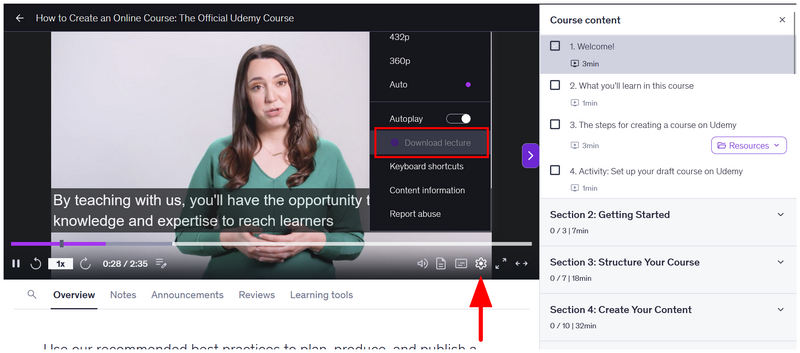
Since downloading Udemy lectures in browsers is entirely controlled by the lecturer, the only way to save Udemy videos to your desktop is to use our third method, which features ArkThinker Screen Recorder.
Method 3: Record Personal Study Notes with Screen Recorder
With two of the official download options on Udemy now discussed, we can conclude that offline saving is completely different and far more restricted than regular downloads. As such, the practical solution of using ArkThinker Screen Recorder is our proposed third method for downloading Udemy videos.
Unlike browser-based video download extensions, ArkThinker’s screen capture software is installed directly into your computer. It does not operate as a plug-in on your browser. With that in mind, it can bypass the encryption on protected videos, such as Udemy lectures.
To learn how to record Udemy videos using ArkThinker Screen Recorder, make sure to read our three-step guide below.
Make sure to download it as well for an easier time learning how to use the product.
Open your browser and go to the Udemy course you want to record. Then, open ArkThinker Screen Recorder and stay in the Screen Recorder mode.
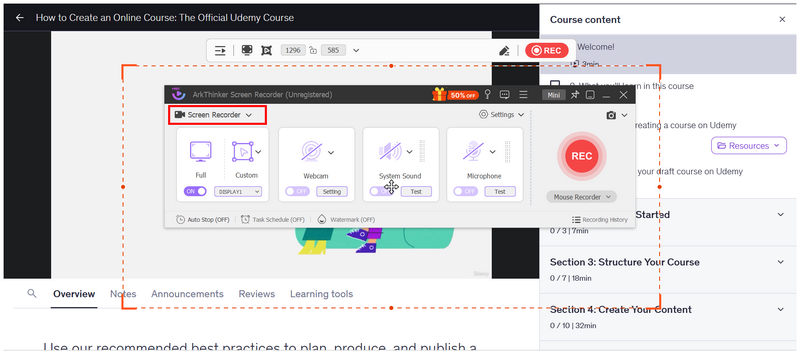
Set the Udemy lecture you want to record in full screen. Then, click on the Full Screen mode of ArkThinker Screen Recorder’s recorder interface.
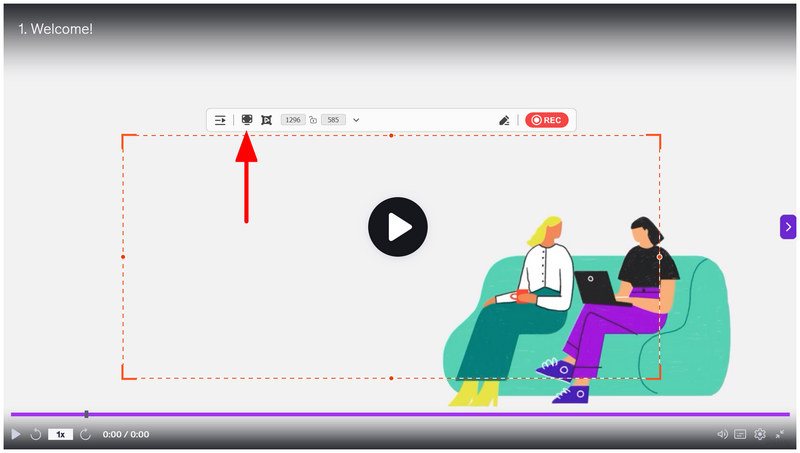
Now that the recorder interface is also set to full screen. Click on the REC button of ArkThinker Screen Recorder and then play the Udemy lecture to begin recording.
After the recording process, ArkThinker Screen Recorder will open its post-processing menu. There, you can adjust the Udemy recording you just captured using the program’s editing tools, such as the Advanced Trimmer, Video Compressor, File Merger, and more. To locate where the recording is saved, simply click on the Folder button.
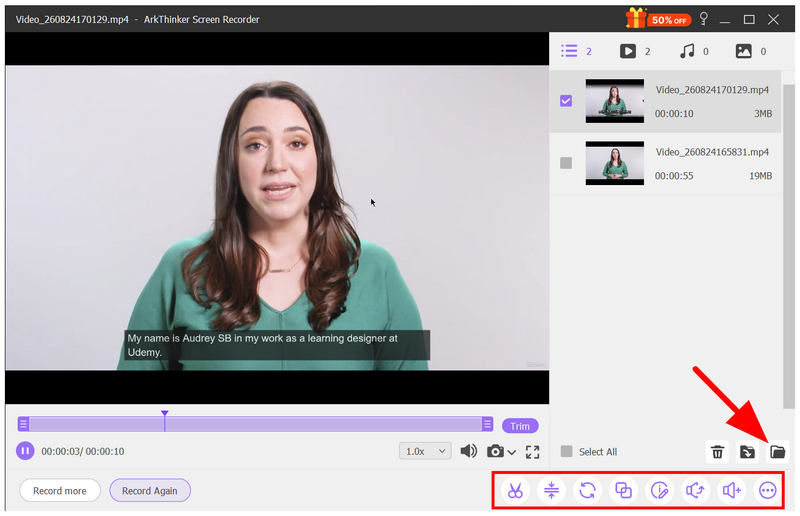
If you are getting frustrated because Udemy encrypted videos cannot be downloaded using Fetchv and other browser extensions for screen recording, our next highly recommended option is to use desktop-based screen recorders. Get started with using ArkThinker Screen Recorder.
Part 4. Legal Considerations When Saving Udemy Course Content
Based on the information we discussed in the first two sections of the article, anti-piracy measures strongly protect Udemy videos. Since most courses on the platform are paid, recording an online course and then reproducing it is a form of piracy.
To avoid any legal issues, make sure to use only screen-captured or downloaded Udemy lectures for personal backups or other needs. Do not share them online or even offline via external and traditional file transfer methods.
Part 5. FAQs About Downloading Udemy Videos
Is the Udemy learning platform legit?
Yes, it is. Udemy is a legitimate online platform. It offers legitimate courses, all of which include certificates upon completion.
Can I download videos from Udemy?
No, you cannot. You can only save Udemy videos for offline viewing. Direct download is not available in the program.
Can downloaded Udemy clips be shared offline?
No, you cannot. Downloaded Udemy clips are only saved in the app. There will be no video file copy of the Udemy lecture saved in your local files.
What format are Udemy videos saved into?
This information is unknown, though Udemy videos are not saved as a local file, which makes learning their format difficult. However, MP4 or WebM is most likely the format used, since one is designed for accessibility and the other for web-based viewing.
Does screen recording work in Udemy?
It depends on the recorder. Browser-based recording, such as dedicated Google Chrome or Firefox screen recorders, will fail to capture Udemy. However, desktop options like ArkThinker Screen Recorder can screen-record Udemy videos.
Conclusion
With the practical methods to save or download Udemy videos offline now discussed, we hope this article will help you digest your online courses more efficiently, so you can listen to or revisit your Udemy lectures wherever you go and on whatever device you prefer. This will be even more apparent if you plan to record your Udemy lessons and watch them completely offline by saving your videos to your local files using ArkThinker Screen Recorder.
What do you think of this post? Click to rate this post.
Excellent
Rating: 4.9 / 5 (based on 701 votes)


