


LeiaPix Converter Review: Is This AI Tool The Best for 2D to 3D Conversion
If you’ve been on the lookout for a tool that helps you effortlessly convert 2D images to 3D, LeiaPix Converter might have popped up on your radar. In this article, we’ll break down everything you need to know about LeiaPix: how it works, its pros and cons, whether it’s free, and how it stands against other conversion tools. Whether you’re an artist, designer, or just someone who loves experimenting with visual effects, this review will give you the lowdown on the LeiaPix AI tool.

- GUIDE LIST
- Part 1. Overall Review of LeiaPix Converter
- Part 2. Is LeiaPix Free
- Part 3. How to Use LeiaPix Converter
- Part 4. LeiaPix Converter Alternative
- Part 5. FAQs
Part 1. Overall Review of LeiaPix Converter
What is LeiaPix Converter?

LeiaPix Converter is a cutting-edge tool powered by LeiaPix AI technology, designed primarily to convert 2D images into 3D models with impressive detail and precision. The software uses AI to analyze and reconstruct flat images, adding depth and creating a 3D effect. It's an intuitive tool that also allows for video editing and 3D rendering, making it versatile for creators in many fields.
- Seamless 2D to 3D conversion: One of the biggest advantages of LeiaPix is its ability to transform standard 2D images into lifelike 3D visuals. Whether it’s a portrait or landscape, the AI algorithms work to add realistic depth.
- User-friendly interface: The interface is clean and easy to navigate, even for beginners. You don’t need any advanced technical skills to use it effectively.
- Wide range of applications: LeiaPix isn’t just for converting images. It’s also perfect for video editing, enhancing 3D models, and creating immersive content for AR/VR projects.
- AI-powered: The integration of AI makes the conversion process quick and efficient, automatically identifying key features of the images and transforming them into 3D formats.
- Free version available: LeiaPix offers a free version with some limitations, so users can test out its features before committing to a paid plan.
- Speed: The conversion process is incredibly fast. Upload, adjust, and download—it usually takes under a minute for a high-res image.
- Limited features in free version: While LeiaPix offers a free plan, it’s somewhat limited in terms of the features it provides. To fully unlock its potential, a paid subscription is required.
- Occasional quality issues: Though the 2D to 3D conversion works well for most images, some complex images may not render as smoothly, leading to a less-than-ideal result.
- Requires high-performance hardware: For large-scale 3D projects or videos, you might need a more powerful computer, as the tool can be resource-intensive.
- Export limitations: The best-quality exports (like LFP for Lightfield display) are niche. The popular GIF and MP4 exports are great, but some options require more advanced accounts or are proprietary.
Customer Ratings and Feedback
Based on customer reviews, LeiaPix receives generally positive ratings, particularly for its ease of use and impressive conversion capabilities. Here’s a breakdown of how users rate LeiaPix:
Price: 4/5 - Many users appreciate the free version, but the full potential of LeiaPix unlocks only with a premium plan.
Customer Service: 4.5/5 - LeiaPix’s support team is quick to respond and helpful, with multiple channels of communication.
Product Quality: 4/5 - The quality of 2D to 3D conversions is impressive, but occasional issues with complex images have been noted.
Editor's Summary
In conclusion, LeiaPix Converter is a powerful and user-friendly tool for anyone interested in converting 2D images into 3D. Its AI technology simplifies the process, making it accessible to both beginners and experienced users. However, for full functionality, the paid version is the way to go.
Part 2. Is LeiaPix Free
This is one of the biggest questions I had, and the short answer is: Yes, the core functionality of the Leiapix converter is largely free.
When you sign up for a free account, you gain access to the main 2D-to-3D conversion engine. You can upload images and export them as GIFs, MP4s, or side-by-side 3D images without paying a dime. This makes the Leiapix AI free claim absolutely true for most casual users.
However, there are two key things to note:
1. Watermarks: Free exports may sometimes include a watermark, especially on higher-resolution outputs, but this can change based on their current offering. (Learn it here to remove watermark from image here.)
2. Credits system: The platform often uses a credits system for high-end exports, special features, or removing watermarks. While you usually get free starting credits, heavy or commercial users might need to purchase more.
Tip: If you plan on using LeiaPix for a lot of personal projects, I recommend checking their pricing page. Sometimes a small subscription fee can unlock unlimited, watermark-free access, which is a great value if you love the effect!
Part 3. How to Use LeiaPix Converter
Using LeiaPix Converter is simple and straightforward. Here’s a step-by-step guide to get you started:
Upload your image
First, head to the official LeiaPix website and sign up or log in. Once you’re in the dashboard, hit the "Upload" button and select the 2D photo you want to convert. The tool supports standard image formats like JPG and PNG.
Customize the 3D image style
On the right-hand panel, you’ll find a suite of simple but powerful 3D conversion style tools. This is where you apply your personal touch: Parallel, Cross-eyed, and Anaglyph
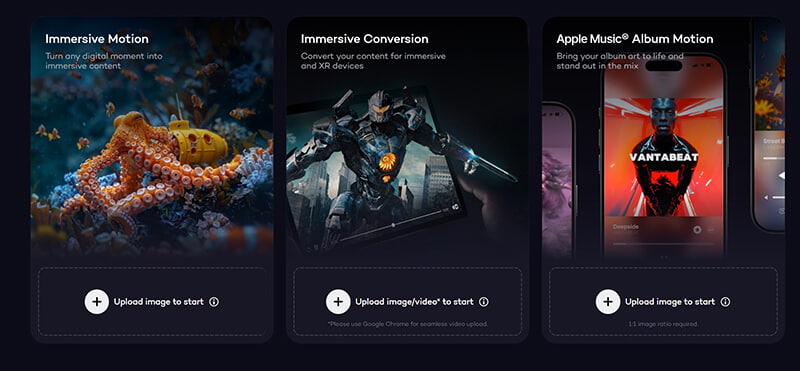
Besides, you can adjust the Amonut of Depth slider to manually paint it. This is fantastic for fixing any AI mistakes and ensuring accuracy.
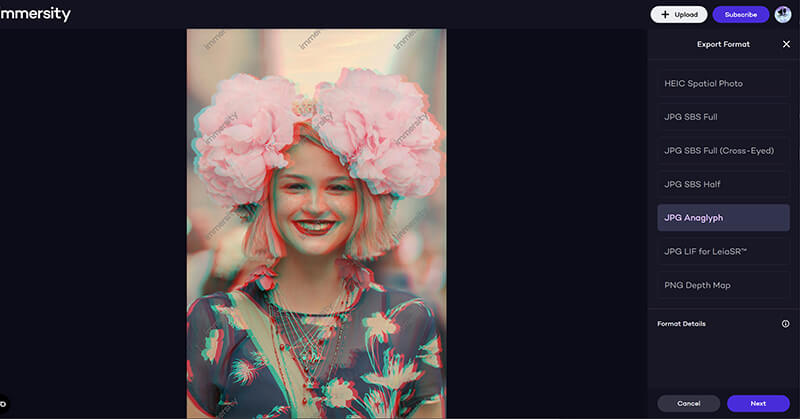
Export your creation
Once you are satisfied, click the "Export" button. A dialog box will appear, letting you choose your format. For sharing on social media, JPG and PNG are your best bet. Click Next to save and download the 3D image file to your computer.
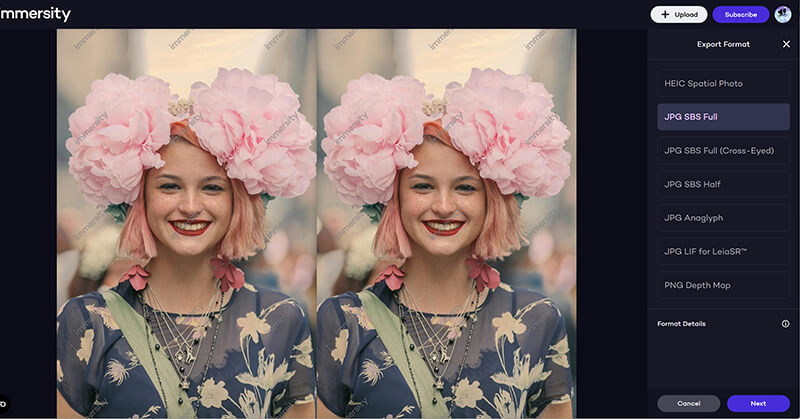
Tip: For the best results, use photos with clear foreground and background separation, like a close-up of a friend at the beach or a shot of a monument in a park. The AI has an easier time distinguishing the layers!
Part 4. LeiaPix Converter Alternative
For converting full-length videos from standard 2D to an immersive 3D experience, ArkThinker Video Converter Ultimate is the best choice because it provides a dedicated 3D Maker tool that uses algorithms to accurately apply stereoscopic effects to moving footage, offering a level of control and quality that web-based photo converters cannot match.
Dedicated 3D maker: It includes a specialized tool specifically for converting 2D videos into a variety of 3D formats.
Multiple 3D options: Supports all popular 3D viewing modes, including Anaglyph (for glasses on any screen) and Side-by-Side (for 3D TVs and VR headsets).
Adjustable depth: You can manually control the level of the 3D depth effect to optimize the viewing experience for your specific video.
Batch processing: Convert multiple 2D videos to 3D simultaneously, saving a huge amount of time.
Built-in editor: Allows you to trim, crop, or enhance the video quality before applying the 3D effect, ensuring a clean final product.
Part 5. FAQs
Can I use LeiaPix for video editing?
Yes, LeiaPix offers basic video editing capabilities, including 3D enhancements for videos. This makes it versatile for users who want to integrate 3D effects into their video projects.
Does LeiaPix support multiple formats?
Yes, LeiaPix supports a variety of image and video formats for conversion, including JPG, PNG, TIFF, and MP4.
Can LeiaPix convert 3D images back to 2D?
No, LeiaPix is designed primarily for converting 2D images into 3D, not the other way around.
Conclusion
LeiaPix Converter is an innovative tool that uses AI to bring 2D images to life in 3D. Whether you're a beginner or an experienced designer, this software is user-friendly and effective. While the free version is a great introduction, the paid version unlocks more powerful features. If you’re looking for an alternative, ArkTinker Video Converter Ultimate offers advanced tools for 2D to 3D maker and video editing.
Remember that 3D rendering can be resource-intensive, so make sure your computer meets the necessary specifications for smooth performance. Happy creating!
What do you think of this post? Click to rate this post.
Excellent
Rating: 4.9 / 5 (based on 496 votes)


