


Top 4 MP4 Splitters for Windows, macOS, and Linux in 2026
With the rise of short-form content as the primary entertainment option on modern social media, the need for reliable software and video editing tools to split long MP4 videos into smaller parts has become increasingly important. These are very practical when creating short-form videos from long recordings such as podcasts. In this article, we will review four of the most dependable MP4 file splitters across different operating systems. We will review these tools based on their main uses, pros, and cons.

- GUIDE LIST
- Part 1. Multi-Purpose Video Suites with High-Speed MP4 Splitter Features
- Part 2. Dedicated Lossless MP4 Splitter Utilities for Instant Saving
- Part 3. FAQs About MP4 Splitter Apps
How We Test and Review
- • We used modern Windows 11 and macOS Tahoe laptops as the testing devices for each tool.
- • These devices run on Intel Core i7 and M5 chips, respectively, with both running on 16GB of RAM.
- • Each video converter tool was tested using a 5-minute short video and a digital copy of a 2-hour movie.
- • The editing performance was measured by timing the total conversion process.
- • To ensure consistent performance, we made sure that each program is the only one opened on the computer during the editing.
| MP4 Splitter Software | Installation Required | Video Splitting System | Pricing | Best Used For | Reviewer Score |
| Arkthinker Video Converter Ultimate | Yes (Windows, macOS) | Frame-accurate trimming Timestamp trimming | Free – $15.60 | Users who want to apply video adjustments when splitting videos. | 5/5 |
| LosslessCut | Yes (Windows, macOS, Linux) | Keyframe trimming | Free (Open-source) | Fast and efficient splitting of large MP4 files. | 4/5 |
| Bandicut Video Splitter | Yes (Windows) | Keyframe trimming | Free – $38.47 | Beginners looking for quick and easy video splitting. | 4/5 |
| AvidEMUX Free Editor | Yes (Windows, macOS, Linux) | Keyframe trimming | Free (Open-source) | Users looking for a lightweight editor for manual trimming. | 3/5 |
Part 1. Multi-Purpose Video Suite with High-Speed MP4 Splitter Features
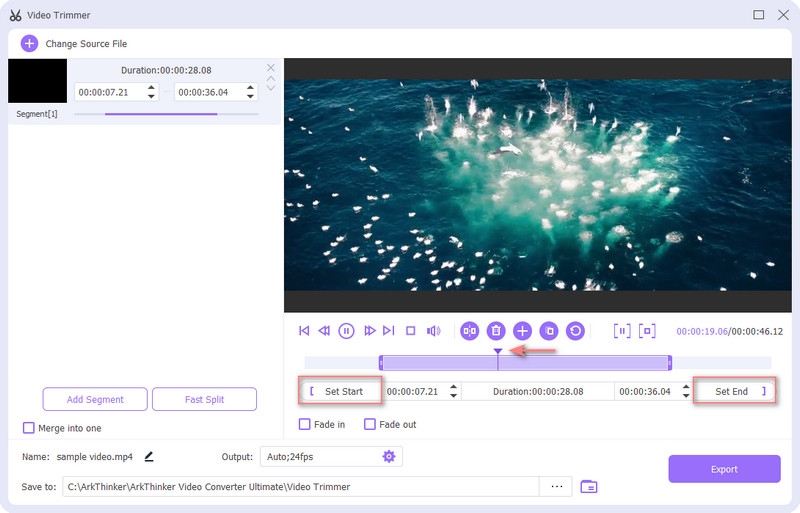
The first MP4 splitter program we will highlight is ArkThinker Video Converter Ultimate, a multi-purpose multimedia software optimized for high-speed MP4 splitting. This software was selected as our first pick since it uniquely supports batch trimming.
Although it was originally developed as a multimedia converter, the software's Toolbox includes a dedicated Video Trimmer feature. There, you can use a slider to trim the video quickly or set a timestamp to trim it more precisely.
To trim multiple portions from your video, select the Add Segment function to create a segmented video clip from your trimmed sections. This is the perfect feature for trimming specific sections in a long-form video for short-form content.
With the addition of a simple slider-based trimming tool and segment options, ArkThinker Video Converter Ultimate is a good choice for trimming videos, whether you are a beginner or an experienced video editor.
Given the program's practicality, we highly recommend using this tool as your MP4 splitter. You may download it using the link below.
- Precise MP4 cutting by timestamp, slider, or segment.
- Retains the video quality of the split video file.
- Equipped with other advanced video editing tools, such as a video merger, a cropper, and video effects.
- Some advanced features require the premium version.
- Its advanced features may be too much for users who only want basic trimming.
Part 2. Dedicated Lossless MP4 Splitter Utilities for Instant Saving
LosslessCut Open-Source Splitter: Best for Lightning-Fast Cutting
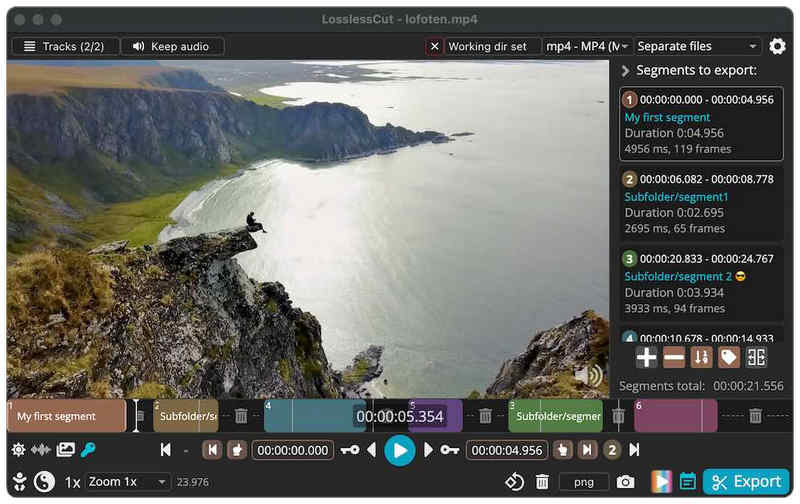
When selecting a reliable free MP4 splitter, LosslessCut should be one of your top considerations. This open-source video splitter is one of the best free video cutters, even for advanced editing tasks like trimming movies and long videos. This was made the case since split videos processed in it will retain their original quality.
Unfortunately, its interface design is not optimized for beginners. If you want to use it for quick conversions, you have to learn the basics of the software’s key functions. You also have to understand keyframes, since they are the program’s primary system for precise cuts.
- Does not re-encode split videos to retain original quality.
- Free and open-source software.
- Frame-accurate navigation for selecting multiple cut points.
- The interface is not optimized for beginner users.
- Require learning keyframes for precise cuts.
- Lacks advanced editing settings such as transitions, filters, and video effects.
Bandicut Video Splitter: Best for Precise Frame-by-Frame Selection
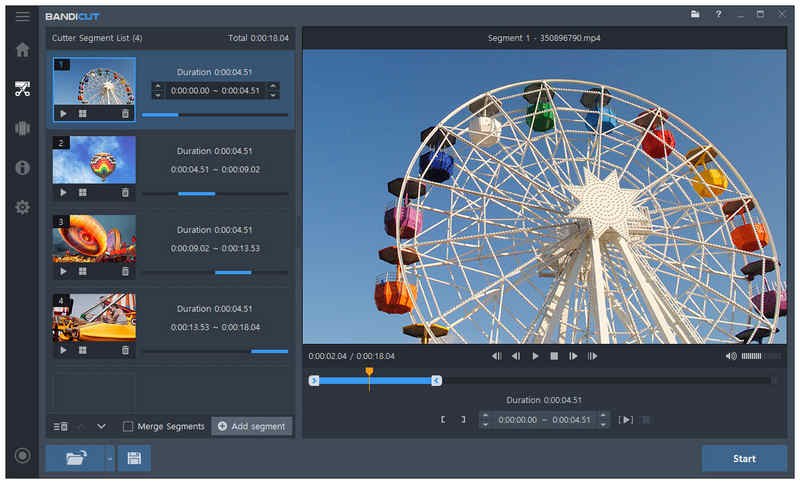
Moving forward, we will discuss the best option for precise frame-by-frame cutting with BandiCut Video Splitter. In addition to the software’s high-precision cutting, this program offers two options to trim MP4 files: re-encoding or lossless-quality trimming. This gives its users practical options if they want quicker conversion or prefer 1:1 quality.
Much like its popular cousin in BandiCam, the software is free to use, though it includes watermarks. It is also an exclusive Windows software. Unfortunately, its minimal video editing features are perhaps its most limiting downside.
- Offers video re-encoding mode and lossless quality trimming.
- Beginner-friendly interface design.
- Efficiently processes large MP4 files.
- Free version edits have watermarks.
- Only available on Windows.
- Minimal video editing features.
AvidEMUX Free Editor: Best for Adding Minor Adjustments During Splits
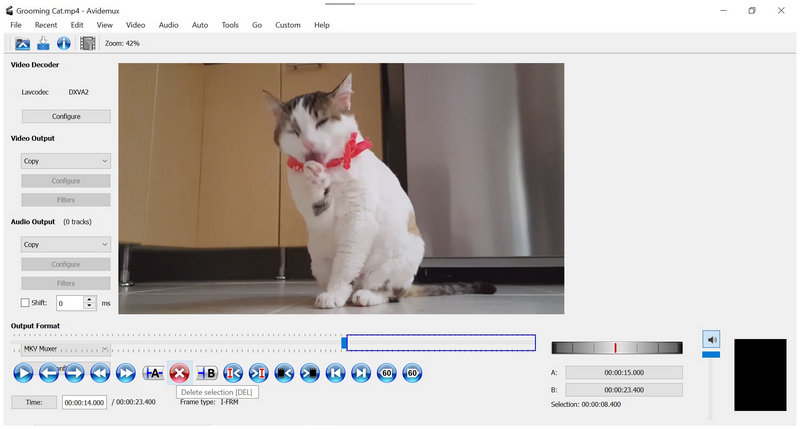
Finally, the last program we recommend is the AvidEMUX editor, another free and open-source program. This cross-platform-ready software has its niche when it comes to adding minor editing options during MP4 audio-video splitting.
Since it is closer to traditional video editors, this program is one of the best options for skilled users who can handle manual video editing. However, you have to overcome the shortcomings of the program’s outdated-looking interface, especially when compared to modern programs and operating systems.
- Free and open-source.
- Cross-platform availability on Windows, Mac, and Linux.
- Made for editors who prefer manual video editing tools.
- Outdated-looking interface, especially on modern operating systems.
- Steep learning curve.
- Slow workflow if you only want quick MP4 splitting.
Part 3. FAQs About MP4 Splitter Apps
Is it hard to split an MP4?
No, it is not. Cutting or splitting videos is a basic editing adjustment. This editing option is one of the best solutions for repurposing long videos.
Should I use a video editor to split MP4 files?
Yes, you can. Using traditional video editors as MP4 splitters and joiners is a safe option. Video editors are designed to be used as such.
What is the best video editor for cutting MP4?
When selecting an MP4 splitter for Mac or Windows, you can use traditional editors such as Adobe Premiere Pro. However, there are more beginner-friendly options if you only want to trim a basic video. In this case, using the Video Trimmer tool of ArkThinker Video Converter Ultimate is a good option.
Should I use an online cutter to trim an MP4?
Yes, you can. Using web-based tools to split MP4s is a practical alternative. However, avoid editing personal videos, as online MP4 splitters store uploaded data on their cloud servers.
Why should I trim MP4 videos?
Trimming MP4 videos is useful for creating short-form content. It is also a good option if you want to remove unnecessary portions of your video. Most importantly, video trimming is an essential editing skill you need to learn.
Conclusion
Now that we have reviewed the 4 best MP4 splitters, we hope that you can now select the program that best suits your needs. These tools are solid additions to your multimedia editing arsenal. If you prefer quick editing, LosslessCut should be your main option. For precise cutting, BandiCut is the way to go. However, if you prefer an overall balance, ArkThinker Video Converter Ultimate should be your choice, whether you are a beginner or an experienced editor. Make sure to download the program using the link below.
What do you think of this post? Click to rate this post.
Excellent
Rating: 4.9 / 5 (based on 771 votes)


