


MP4 or MOV: Which Video File Format Should You Use?
A video is a sequence of moving pictures that is rapidly displayed at a 24 to 60 frames per second, usually to capture motion. This is then associated with audio, making it a useful medium for documentation, imparting a message, and more. Moreover, as a powerful medium, video can have many formats in which the video is contained, and MOV and MP4 are among the most popular and widely used digital video file formats to exist today. That being said, as video can be stored in many formats, each of these video file formats has its unique characteristics or properties that help video to be able to play across devices, be of high quality, and more. That’s why it is important to choose a suitable video file format in order to make a video playable, always in pristine quality, as well as shareable across devices, like what MOV and MP4 offer.
This article has taken this opportunity to have an in-depth look at the two popular video file formats (MOV and MP4) by defining what both of them are and how they differ from one another through listing of their key differences to provide readers with an idea which video file format is best to use for their videos. Furthermore, whether you are aiming for high-quality video file storing or making your video playable across multiple devices, this article will also teach you how to convert between MOV and MP4 video files to make your video file format storing task a lot easier by using a free-to-use tool.

- GUIDE LIST
- Part 1. What are MOV, MP4, and Their Key Differences
- Part 2. How to Convert Between MOV & MP4
- Part 3. FAQs about MOV and MP4 File Format
Part 1. What are MOV, MP4, and Their Key Differences
Before we start defining and differentiating MOV and MP4, it is important to know what a multimedia container format is. Like MOV and MP4, they are a type of digital containers in which it stores audio, video, metadata, chapter markers, and subtitles in a file. They are responsible for making a synchronized playback of the aforementioned things, allowing a smooth, synchronized video playback.
What is MOV?
MOV is a type of video file format or a digital container developed by Apple, solely designed to serve as Apple’s very own video file format that is primarily used in their QuickTime frameworks and software. MOV is developed to store video, audio, and text together at high-quality audio and video, making it an ideal video file format for storing video files as well as professional video editing.
Mostly known as high efficiency and compatibility across the Apple ecosystem. MOV video file format is derived from QuickTime File Format, known as QTFF. Now, MOV firstly it is compatible with the likes of Apple’s iMovie and Final Cut Pro, but now a lot of players and devices are capable of handling MOV files, but it is still not as universal as MP4.
What is MP4?
MP4, also known as MPEG-4, is another type of digital container for video file formats. A much more universal standard of video file format that is supported by almost all devices, systems, and web browsers compared to MOV. Moreover, MP4 is an incredible video file format to choose to store a video for its versatility across multiple video editing software and players.
As a highly efficient video file container,r it has a good balance between file size and quality, making it more accessible and an ideal choice for streaming services, mobile devices, social media, and more.
Key Differences Between MOV and MP4
MOV and MP4 may appear similar on the surface level as both can store video, audio, and text in synced these formats has a difference in their File Size, Compression Quality, Compatibility, and Video and Audio Quality. Hence, we listed them below for a quick comparison of the two popular video file containers.
| MOV | Properties | MP4 |
| Professional video editing across the Apple Ecosystem workflow. | Best For | Universal sharing of video across devices, streaming, and cross-platform video playback. |
| The video file size of MOV can appear larger due to its lossless compression and multi-track support to make the video as high quality as possible. | File Size | The video file size of MP4 appears to be smaller compared to MOV. This is due to its lossy compression quality that optimizes file size and bandwidth. |
| It has a lossless compression quality that is capable of preserving maximum video quality. | Compression | It has a lossy compression quality that makes up for the balance between quality and file size of a video. |
| Ideally developed for MacOS/iOS, Apple Pro editing tools appear to require extra codecs when used or played on Windows and Android devices. | Compatibility | Universally supported by multiple devices, web-browser players, streaming services, various OS devices, and platforms. |
| It appears to be superior in quality and supports multiple tracks. | Video & Audio Quality | It has a very decent and viewable video quality, but the MP4 video quality appears to be inferior compared to the MOV files. |
Which Format to Use Editing, Sharing, and Storing?
| Use Case | Recommended Video File Format to Use | Reason/s |
| Editing | MOV | MOV appears to be superior in terms of video quality, which makes it ideal for video editing, as it also supports multiple tracks. With MOV being supported by most professional video editing software, it makes it easy to work and edit MOV video files. |
| Sharing | MP4 | Widely used and compatible across devices, platforms, and browsers. It appears to have a smaller file size with decent video quality, which is ideal for easy sharing across all media and devices. |
| Storing/ Archiving | MOV (For Master Copies) MP4 (For Accessible Copies) | MOV video file format is better for long-term video archival because of its capability to preserve the quality of the video. Whereas MP4 is perfect for everyday use and video playback access with no compatibility issues. |
Part 2. How to Convert Between MOV & MP4
Now that you have an idea of the difference between MP4 and MOV files, and on the other hand, you want to switch between video file formats to avail their characteristics in your video files without facing quality and playback issues, then it is time to rely on a high-quality video converter tool like the ArkThinker Video Converter Ultimate. This powerful and free-to-use video converter tool allows users to change their video and audio file format to any file format they prefer, like the MOV or MP4, without compromising on the video and audio quality of their media file.
Key Features
- • Faster video and audio file conversion process.
- • Capable of multiple batch conversion.
- • Guaranteed a lossless quality in every converted file.
- • Supported 1000+ video and audio file formats.
- • Can be used to edit a file’s metadata.
Steps on How to Convert MOV & MP4 Files
Open your ArkThinker Video Converter Ultimate software tool on your Windows or Mac devices. If you don’t have it, please be sure to install the software tool first before proceeding to the next step.
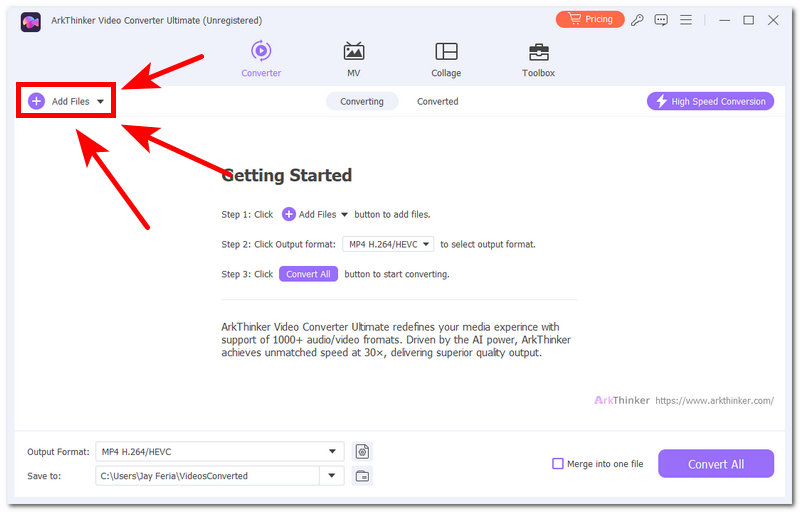
Once the video converter tool is open on your device, from its main interface, add the video file you wish to convert to MOV & MP4 files by clicking on the + button or the Add Files button in the upper-left corner of the tool.
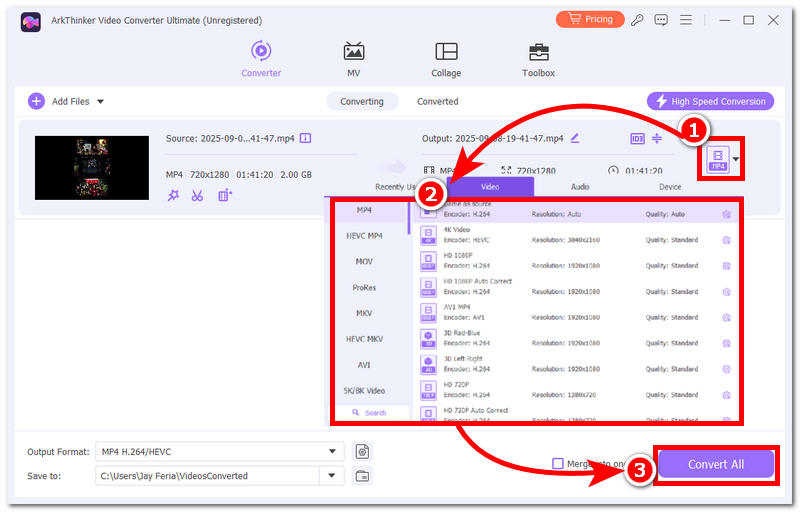
Once the video file is loaded in the video converter tool, head over to the right side of the video file and click on the video file format button, and from there select your preferred video file format to convert your video into, whether it be MOV or MP4.
Once you are done choosing your preferred video file format to convert your video into, proceed to click on the Convert All button to start the conversion process.
Part 3. FAQs about MOV and MP4 File Format
Is MOV better than MP4 ?
In terms of video quality, MOV appears to have higher quality and is perfect for professional use and editing. While MP4 can have a slight difference in terms of video quality, it is decent enough as a viewable video file, as MP4's main purpose is to be more universal, small in size, and compatibility.
Is MOV the same as MP4?
No, they are not the same. While they are both types of video file formats used to store video, they differ in a lot of ways. As MOV is developed by Apple and is optimized for high-quality consumption or professional editing, the MP4, on the other hand, is intentionally made to be used and accessible across devices for its compatibility and efficiency in storage size.
Does converting MOV to MP4 reduce quality?
In most case yes, but when you are using a high-quality grade of video converter too,l and of course, with the right use and right setting of the tool, the difference is unnoticeable, hence it can still appear as pristine quality.
Conclusion
Truly, a video is a useful medium to store imagery into a moving one, as it can have audio in sync; hence, using a proper video format is necessary. This article has reviewed MOV and MP4 as video file containers to ensure readers will know their differences in detail. Moreover, the two popular and sometimes confusing video file formats (MOV and MP4) by defining and differentiating both video containers from their properties, file size, compression and more. Furthermore, if you can’t decide which video file format to use, but want to try both formats, then you may try to convert your video file via a third-party yet professional-grade video file converter like the ArkThinker Video Converter Ultimate to ensure a lossless quality when converting between different video file formats.
What do you think of this post? Click to rate this post.
Excellent
Rating: 4.9 / 5 (based on 690 votes)
Find More Solutions
MKV Format: Introduction, How to Open and Convert MKV What is 4K Resolution and How to Upscale to A 4K Video? What is AVI and How to Play, Open, Convert, or Edit AVI WMV File Extension: What is WMV and How to Open and Play WMV 3GP File Extension: What is 3GP Format and How to Open and Play 3GP Understanding RMVB: What RMVB is and How to Play RMVB FileRelative Articles
- Convert Video
- Step-by-Step Guide to Convert M2TS to MKV
- Top 5 WebM to MP4 Converters in 2024
- How to Convert WAV to MP3 in 5 Tools Without Limits
- Top 4 Converters to Change Video Size and Aspect Ratio
- 4 Ways to Convert MP4 to WebM Online. Computer, and Mobile
- What is DAV File and How to Play It
- Ultimate Review to XMedia Recode [Steps Incl.]
- Best 5 Ways to Help You Convert QuickTime Format to MP4
- How to Get Your MP4 Movie and Export It from VLC Player
- VideoSolo Video Converter Ultimate Review [2024]


