


How to Download Music from Pandora Using 3 Methods in 2026
Music streaming services have emerged as the primary option for modern audio entertainment. Among these platforms, Pandora is one of the leading competitors for both music and podcast listening. Unfortunately, these services are not easily accessible because there is no official option to download their content. The offline listening option is simply too limited. In this article, we will provide three alternative methods to help our readers learn how to download songs on Pandora: the built-in offline download, an audio recorder, and a third-party option that makes downloaded music files more accessible through format conversion.

- GUIDE LIST
- Part 1. Overview of Pandora Music Playback Features
- Part 2. Can You Download Music from Pandora to Listen Offline
- Part 3. How to Download Music from Pandora
- Part 4. Pandora Offline Mode vs Audio Recording Comparison
- Part 5. FAQs About Downloading Music from Pandora
Part 1. Overview of Pandora Music Playback Features
To get started with Pandora’s music playback features, let us first discuss the differences between the music streaming platform’s paid Plus and Premium plans, since these are the plans that offer Pandora’s offline listening.
Subscribing to the Plus plan will allow you to enjoy all of Pandora’s features completely ad-free. You can enjoy essential playback features such as unlimited skips, repeat, higher-quality audio, and limited offline listening on up to three music stations. Plus plan starts at $4.99/month.
Moving forward, the Premium plan is the more expensive option in Pandora that offers more features. On top of the features in the Plus plan, subscribing to Premium gives you more extensive offline listening: you can now save songs, albums, and podcasts to your collection, not just music stations. You will also have access to the highest-quality audio. Pandora Premium costs $9.99/month.
Part 2. Can you Download Music from Pandora to Listen Offline
Offline listening on Pandora is available only on the Plus and Premium plans. With the Plus option, you can listen offline to three of your top stations. However, to listen to albums, songs, and playlists offline without limits, you have to subscribe to the Premium option.
Unfortunately, the offline listening in Pandora is only available in-app. You can only listen to audio saved on your profile and downloaded to the Pandora application. Direct and true file downloading is not available on the music platform.
With Pandora’s features now discussed, let us proceed to the options for saving music offline from the platform, including the built-in solution and the alternative of recording audio on a computer.
Part 3. How to Download Music from Pandora
Method 1: Use Pandora Plus/Premium Offline Mode
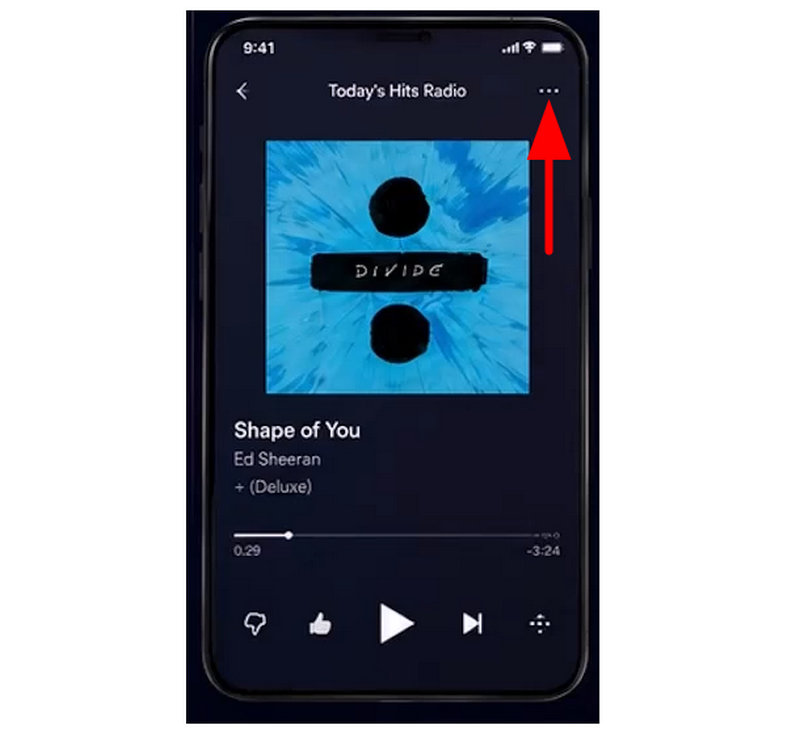
Select the music file you want to download. Then, tap on the Three-Dot menu in the upper right corner of Pandora.
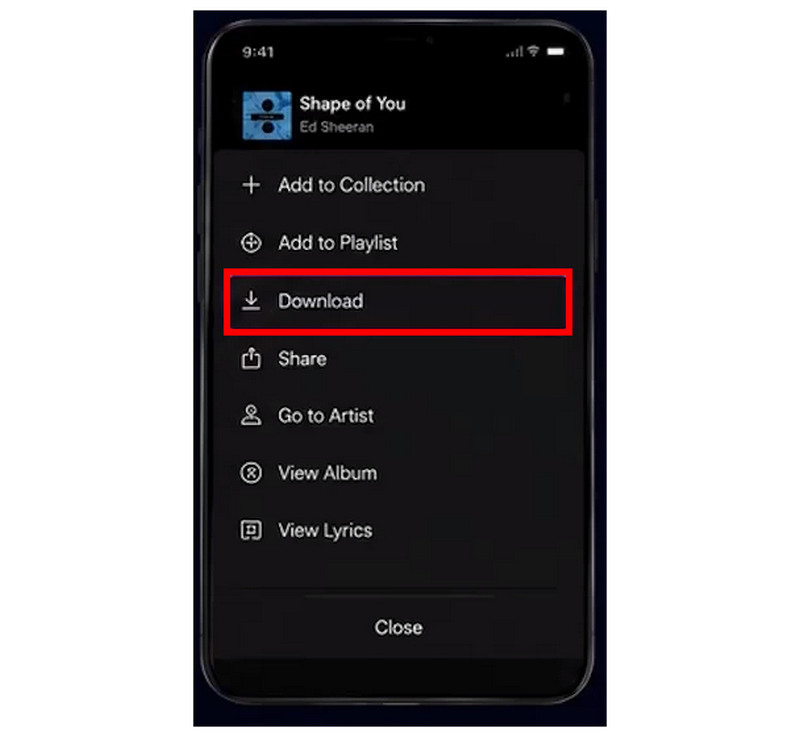
In the menu that will open, select Download. Then set the download quality in the next menu that opens.
To access the Pandora content you saved for offline mode via in-app downloads, go to My Collection and select the Downloads section.
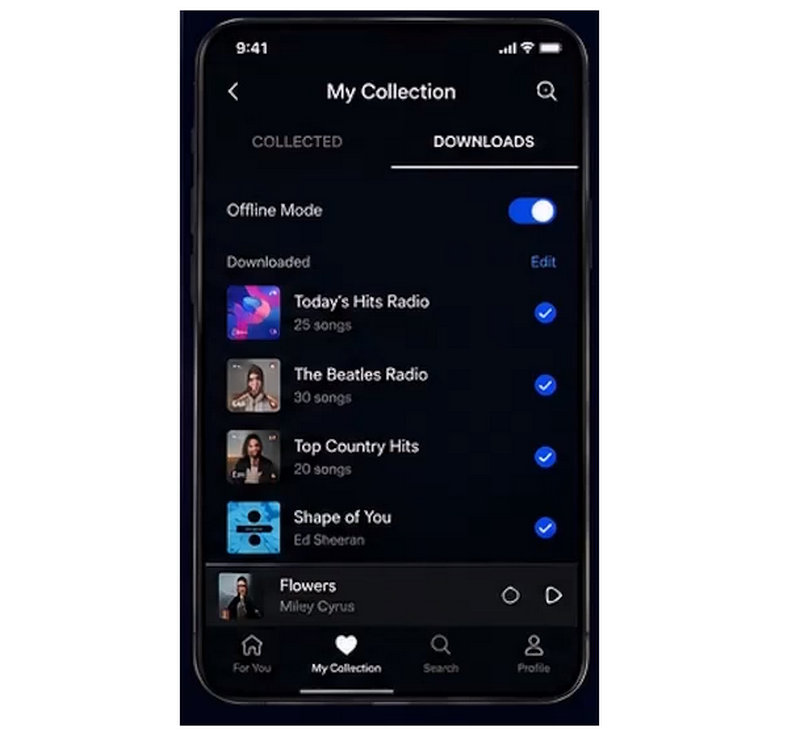
Pandora’s offline listening is available in their mobile app. This works similarly to other streaming platforms such as Spotify and Apple Music. The saved audio will be saved in your own collection.
Method 2: Record Personal Audio with a Screen Recorder
Since Pandora’s offline listening is a subpar alternative to downloading music, this method uses a screen recorder with a high-quality audio recording mode to save music files for direct offline listening. The second method in this article will feature none other than ArkThinker Screen Recorder’s Audio Recorder mode.
The program’s exclusive audio capture mode is an ideal solution for saving music from Pandora’s browser client. This is possible because the recorded system audio from ArkThinker can produce a 1:1 copy of the audio file it captures in your browser.
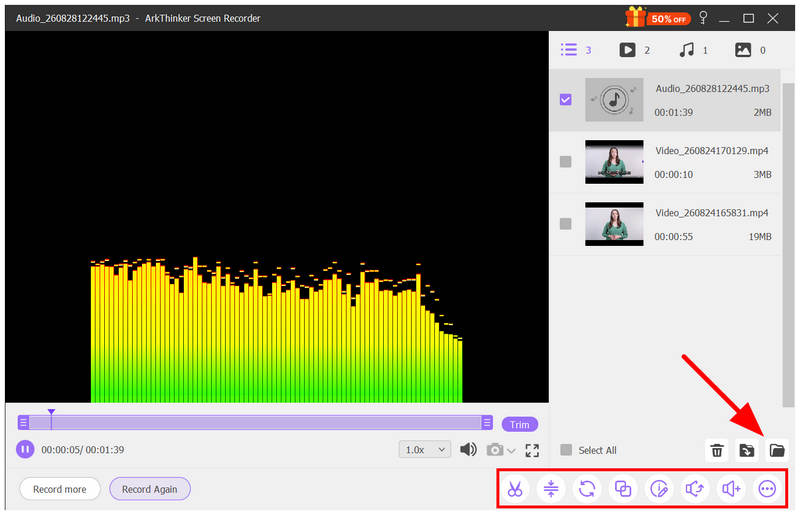
It also helps that the program has practical post-processing features ideal for basic editing of recorded audio, such as trimming, compressing, and adjusting volume.
To learn how to use the tool, please read our guide below. Make sure to download it as well to make it easier to follow the tutorial.
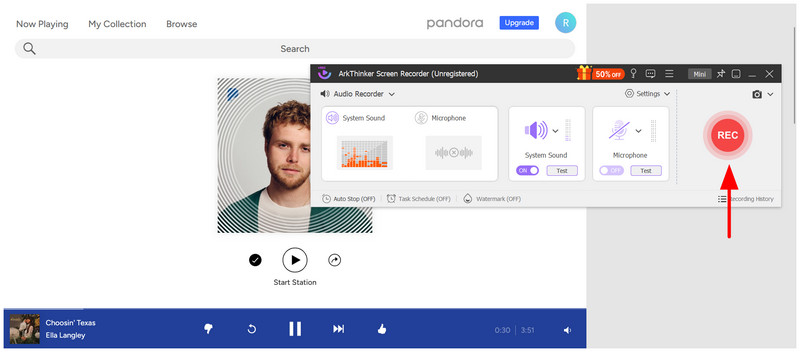
Open Pandora’s website and go to the album, playlist, or radio you want to record.

Next, open the ArkThinker Screen Recorder and change the recording mode to Audio Recorder. Then turn on the System Sound option.
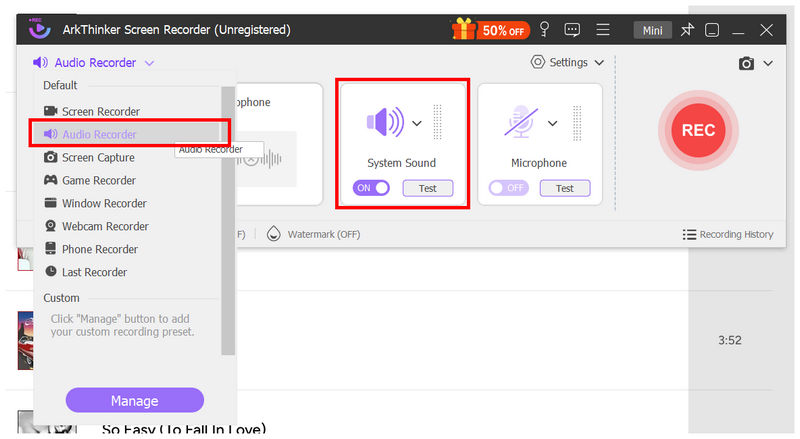
With the audio recorder now active, play the music you want to record, then click on the REC button in ArkThinker Screen Recorder to begin the recording session.
Once the recording is done, you will have access to the recording post-processing menu. There, you will have access to Trimmer, Media Compressor, Volume Control, and other essential editing tools. To access your captured audio, select the Folder button.
Since a download option in Pandora is not available, you have to use alternative methods to save content from the platform as audio files. Among them, using lossless recorders like ArkThinker Screen Recorder is an excellent choice.
Method 3: Convert Legally Obtained Audio Files to Other Formats
As a bonus, this method will provide our readers with the perfect tool to convert legally downloaded audio files to other formats. This tutorial will feature another ArkThinker product, ArkThinker Video Converter Ultimate, which can also convert audio files.
In this tutorial, we will use a legally obtained M4A file from the iTunes Store and convert it to the universal MP3 format with superior compatibility.
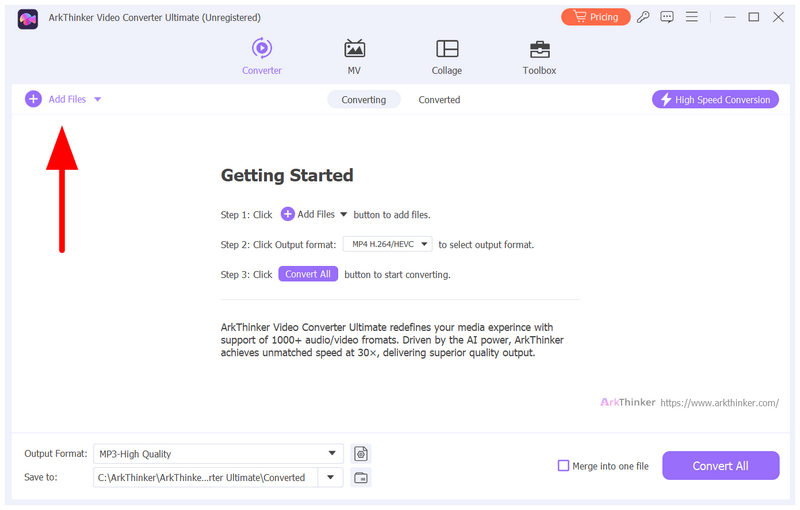
Open ArkThinker Video Converter Ultimate and select Add Files to import the media file you want to convert in the Converter tab.
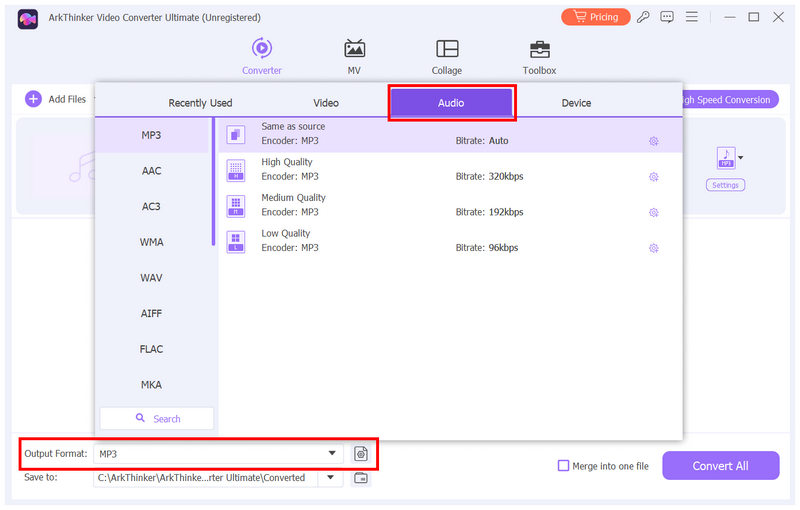
Once the M4A audio is imported, select Output Format. Then, select Audio and choose the file Format you want to convert your audio into. Among the available Conversion Profiles, we recommend Same as Source or High Quality.
With the Output Format now set, click Convert All to begin converting the M4A file to the more flexible MP3 format.
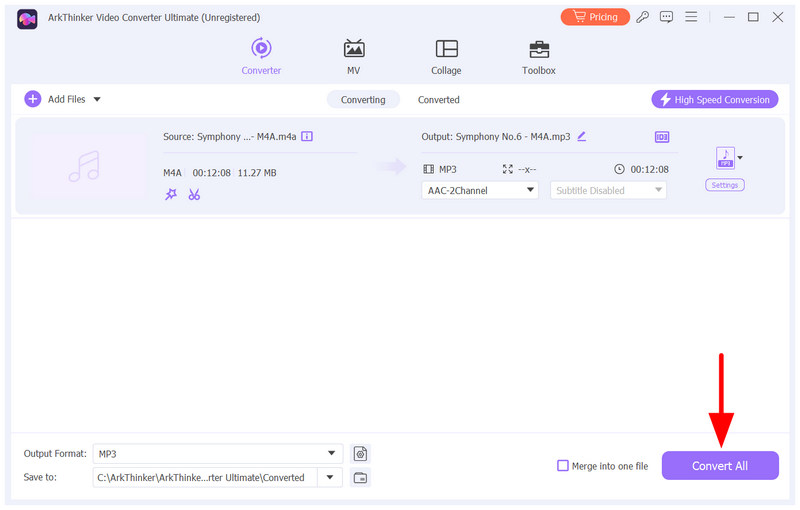
Once you consider downloading music from other sources, using a format converter is the perfect choice for converting your downloads.
Part 4. Pandora Offline Mode vs Audio Recording Comparison
Whether you want to save Pandora content to offline mode or use the best audio recorder programs, the quality will be directly affected by the recording software you use. If you plan to use our recommended ArkThinker Screen Recorder, you won’t have any quality issues, since the tool captures audio exactly as it comes from the source.
Part 5. FAQs About Downloading Music from Pandora
Can I download music from Pandora to my computer?
No, you cannot. Pandora does not download music files locally on a desktop. An alternative is to record system audio from Pandora.
Can you download MP3s from Pandora?
No, you cannot. Pandora does not save local files. It only downloads music via offline listening.
Does Pandora have a downloading option?
No, it does not have one. Pandora only offers offline listening. Traditional downloading is not available for music content.
Can I share Pandora files downloaded to my smartphone?
No, you cannot. Pandora does not save files directly to your smartphone. It only supports saving music for offline use.
Does the Pandora Free version support offline listening?
No, it does not. Pandora only offers offline listening in the paid Plus or Premium plan.
Conclusion
Now that we have discussed the methods you can use to download music from Pandora, we hope that you will now be able to make Pandora content available for offline listening. Among the options on this list, we highly recommend using the audio recording option to produce a local music file that you can share, transfer, or listen to offline for free. In this case, we recommend using ArkThinker Screen Recorder.
What do you think of this post? Click to rate this post.
Excellent
Rating: 4.9 / 5 (based on 701 votes)


