


UHD vs QLED: What’s the Difference (2026 Guide and Tips)
When it comes to modern displays and video quality, the terms UHD and QLED are commonly used. However, the difference between UHD and QLED is a common cause of confusion for users who are still beginners when it comes to videos, display types, and multimedia in general. With that in mind, this article aims to provide detailed tips and an overview of what UHD and QLED really are. We will discuss what they are, their differences, and which one suits better for specific uses.

- GUIDE LIST
- Part 1. What is QLED
- Part 2. What is UHD
- Part 3. UHD vs QLED
- Part 4. UHD or QLED: Which One to Choose
- Part 5. Bonus: Best Video Upscaling Tool for UHD Quality
- Part 6. FAQs About UHD vs QLED
Part 1. What is QLED

Quantum-dot Light Emitting Diode (QLED) is a type of display enhancement technology developed by Samsung for their premium line of flat-screen televisions, which produces better color vibrancy and enhanced brightness.
This improved color quality was made possible by using quantum dots in their television technology. Due to the improved performance of QLED TVs, these units all support UHD quality videos. As a result, the QLED display type improves both picture quality and resolution.
In this case, deciding whether UHD is better than QLED is difficult to argue, as they both work hand in hand.
Part 2. What is UHD
Unlike QLED, which is a type of display enhancement technology, 4K Ultra-HD (UHD) is a type of media resolution with a pixel count of 3840 × 2160. For a more detailed visual example, UHD quality is 2X better than the standard HD resolution of 1080p.
Similar to other resolution types, UHD videos also dictate the pixel count of a media file, whether it is an image or a video. Due to the file’s high pixel demand, these videos work best when viewed on a high-quality television, such as a QLED display.
Due to the drastic difference between Crystal UHD vs QLED, pitting them against each other is simply impossible. The two display terminologies do not share anything between them. One is a resolution type, while the other is a display technology.
Part 3. UHD vs QLED

With the concept of both UHD and QLED now discussed, let us move forward to the key elements of these multimedia display technologies. We will provide information on the main functions, quality, connectivity, price differences, and processor demands of both UHD and QLED displays.
Function
The two options have widely different functions, but they are interconnected. UHD defines the resolution of videos that you are playing. It is a type of video quality, similar to 720p, 1080p, and all resolutions in between and beyond.
On the other hand, QLED display technology is closely tied to UHD, as TVs equipped with this system can fully utilize the potential of UHD and even higher-quality videos. UHD videos generally perform best on QLED displays.
Image Quality
Their image quality is also widely different. UHD has a set quality of 4K resolution, which is 3840 × 2160. On the other hand, QLED displays have improved color quality, such as better vibrance, brightness, and color accuracy.
Connectivity
In terms of connectivity, we can discuss the differences between UHD TV and QLED TV, as these technologies are commonly found in modern entertainment systems. On the one hand, UHD TVs are designed to support videos with 4K resolution. Meanwhile, QLED TVs are equipped with advanced color processing systems that also enable them to play UHD videos without any issues.
With that in mind, all QLED TVs are UHD TVs, but not all UHD TVs are equipped with QLED technology.
Price
With the difference between UHD TV and QLED TV now discussed, their pricing also reflects the quality of technology between them. Generally, UHD TVs are more affordable compared to units with QLED TV technology.
The improved color quality of QLED technology comes at a higher price tag.
Processor
In terms of processor demands, only UHD videos can be discussed, as QLED technology is entirely hardware-based and does not interfere with processor performance. As such, UHD quality videos demand a lot from your computer and media player software, since the improved resolution is hungry for processing power.
You need specialized media players to play 4K videos smoothly, together with strong computer hardware.
Part 4. UHD or QLED: Which One to Choose

Since UHD and QLED technology are completely different from each other, choosing between them is highly influenced by the technology in which they are used. In terms of televisions, QLED is the better option. However, since there are no QLED videos, UHD wins by default.
Ultimately, UHD and QLED are best used in conjunction. To ensure that your 4K video is enjoyed as intended, make sure to watch it on a QLED-enhanced display.
UHD and QLED are too different to choose which one is better.
Part 5. Bonus: Best Video Upscaling Tool for UHD Quality
With the primary differences between UHD and QLED now discussed, we have learned that UHD videos are a type of video resolution offering superb quality for an enhanced viewing experience. As a bonus, this section will feature the best video upscaling software for enhancing videos to UHD quality, courtesy of ArkThinker Video Converter Ultimate.
Together with its primary design as a video converter tool, ArkThinker Video Converter Ultimate’s Converter feature also offers upscaling services, as processed videos can be upscaled to higher resolutions, from standard HD to 4K UHD and beyond, all the way to 8K.
This made the software an efficient option, especially if you already plan on changing the format of your video, instead of using two different tools, the program's versatility allows both upscaling and format conversion to be applied simultaneously.
To learn more about what makes ArkThinker Video Converter Ultimate an excellent choice for producing UHD quality videos, make sure to read its main features below.
Do not forget to download the program as well to make following our step-by-step guide easier.
Main Features:
• High-quality video converter tool designed for changing video formats.
• Built-in video upscaler option for converted videos.
• Supports batch processing of videos, allowing for the enhancement of multiple videos simultaneously.
• Offers essential video editing tools for simple adjustments and editing work.
• Equipped with a toolbox feature that includes over 20 tools for easy video adjustments.
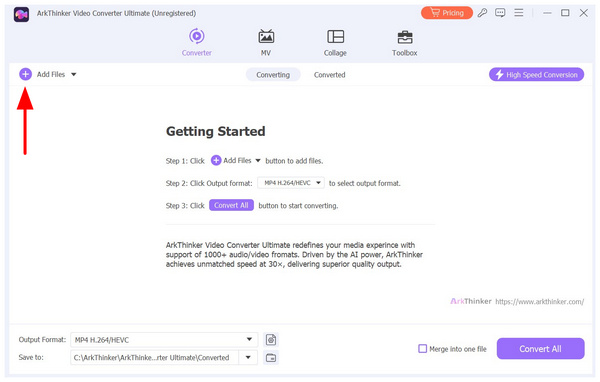
Open ArkThinker Video Converter Ultimate and click on the Add Files button to import the video you want to upscale to UHD quality.
Next, click on Output Format and select the desired format for your upscaled video. In this guide, we will use the MP4 format. Select 4K Video among the available output qualities.
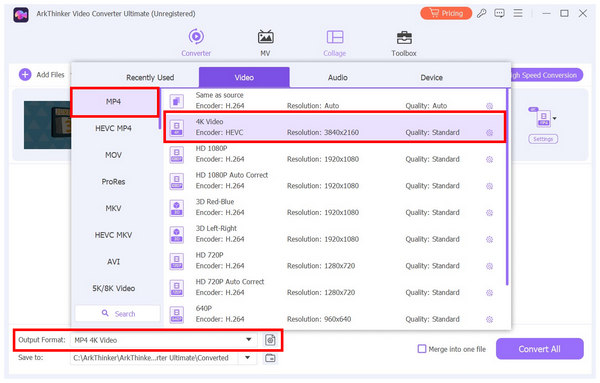
Once the Output Format and the video quality have been set, simply click on Convert All to start producing the upscaled UHD video.
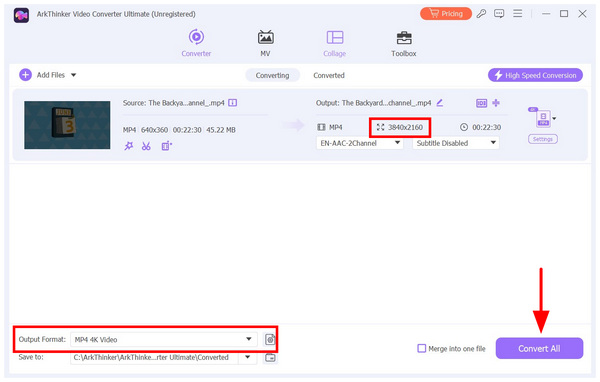
Although the upscaling feature is available in the Converter tool, you still have the option to retain the original video format and apply only an upscaling adjustment. This guide is a perfect example since the video we have up-scaled is already in MP4 format.
Part 6. FAQs About UHD vs QLED
Are UHD videos worth it?
Yes, they are. However, make sure to watch it on a screen or software that can run it properly. For optimal TV watching, ensure you use a UHD TV. For computers, use one with robust hardware, paired with an advanced media player.
Is using a QLED display worth it?
Yes, it is especially if you will buy one for your home entertainment needs. The enhanced color quality of QLED technology is a good addition for all kinds of entertainment. It is best used for movies, video games, sports, and TV shows.
Should I watch UHD videos in a QLED display?
Yes, you should. QLED offers drastically improved color quality, which will highly influence your viewing experience. Watching 4K videos on a QLED will make the viewing experience way more enjoyable.
Can regular media players support UHD videos?
No, they cannot. Regular media players will struggle when trying to play 4K UHD video clips. You should use specialized software when watching one on your computer. You should also ensure that your device supports boosting technologies such as GPU acceleration to make watching 4K-quality video run smoothly.
Why do UHD videos run poorly on computers?
UHD videos with 4K resolution are highly demanding on computer resources. Media players that can run such files are even more resource-hungry. If you want to enjoy 4K videos, a much more recommended option is to just watch them on UHD televisions, ideally with QLED technology.
Conclusion
Now that the differences between UHD and QLED have been discussed, we hope that the information provided in this article has given you enough insight to understand the distinctions between these two display-related technologies. If you are interested in watching high-quality videos in 4K, be sure to follow our bonus guide and use ArkThinker Video Converter Ultimate to upscale videos to UHD quality. You can download the converter using the link below.
What do you think of this post? Click to rate this post.
Excellent
Rating: 4.8 / 5 (based on 479 votes)
Find More Solutions
Remarkable Ways to Convert 1080p to 4K without Quality Loss [Features & Pros & Cons] 4 Best Video Resolution Enhancers 5 Best Video Enhancer Apps for Computer and Mobile Phones What is MP4 and How to Open, Convert, Edit MP4 with Easy Way MOV File: What Is MOV and How to Open/Convert It NTSC VS PAL: Which One Should You ChooseRelative Articles
- Edit Video
- How to Slow Down a Video and Make Slow Motion Video 2022
- Best Slow Motion Cameras and App to Make Slow Motion Videos
- 4 Methods that Let You Make Video 2X Faster at Ease
- Brief Review of the 5 Best Slow-Motion Video Makers
- Detailed Guide to Learn How to Trim Videos on TikTok
- 3 Simple Ways to Learn How to Speed Up TikTok Videos
- Useful Tips That Help You Learn How to Cut Video in iMovie
- Slow Down a Video on iPhone Easily [Bonus Tip]
- How to Trim a Video and Cut out Parts of a Video on iPhone
- Learn How to Cut a Video Clip in Adobe After Effects 2022


